Unlock a world of possibilities! Login now and discover the exclusive benefits awaiting you.

- Qlik Community
- :
- All Forums
- :
- QlikView
- :
- Re: How to change the Legend presentation
- Subscribe to RSS Feed
- Mark Topic as New
- Mark Topic as Read
- Float this Topic for Current User
- Bookmark
- Subscribe
- Mute
- Printer Friendly Page

- Mark as New
- Bookmark
- Subscribe
- Mute
- Subscribe to RSS Feed
- Permalink
- Report Inappropriate Content
How to change the Legend presentation
Hi all,
Anybody could help how to present the legend like Qlik Sense in Qlikview?
Qlik Sense:
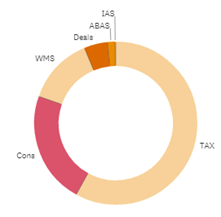
Qlikview:
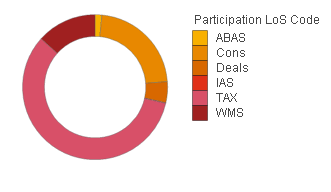
Best Regards,
Alan
- Tags:
- new_to_qlikview

 abirami_palanis
- Mark as New
- Bookmark
- Subscribe
- Mute
- Subscribe to RSS Feed
- Permalink
- Report Inappropriate Content
Hi,
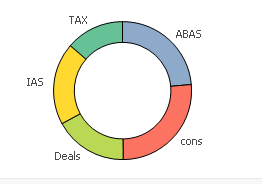
you can present the legend in Qlikview like in Qliksense.
write your expression.
Add one more expression like what you want to display in legend.
Check in value on data points.
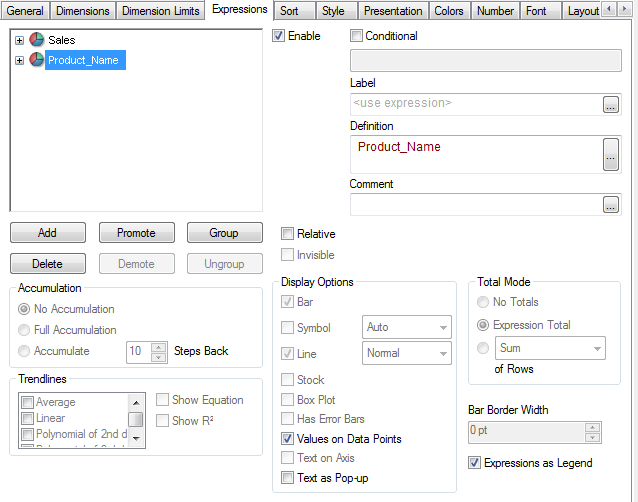
You can get legend in chart like below

 settu_periasamy
- Mark as New
- Bookmark
- Subscribe
- Mute
- Subscribe to RSS Feed
- Permalink
- Report Inappropriate Content
You can try something like the expression
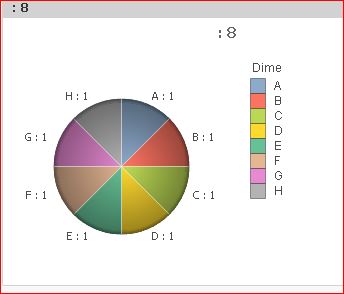
=Dual(LegendField,Count(Measure))
Check the Attachment
 effinty2112
- Mark as New
- Bookmark
- Subscribe
- Mute
- Subscribe to RSS Feed
- Permalink
- Report Inappropriate Content
Hi,
Settu's response is very good but I suggest you try a small variation of it as well as Settu's suggestion:
=Dual(
LegendField
&
Repeat(chr(13)&chr(10), rank(Count(Measure))-4)
,Count(Measure))
This technique is one I learnt from Stephen Redmond's useful book Qlikview for Developers Cookbook. The repeat function adds carriage returns to your 5th and 6th label and this staggering should make them easier to read.
- Mark as New
- Bookmark
- Subscribe
- Mute
- Subscribe to RSS Feed
- Permalink
- Report Inappropriate Content
Thanks to Abirami Palanisamy / settu_periasamy / Andrew Walker.
All your methods work. I can't see any difference between these 3 methods. To me, a rookie of qlikview, Abirami and settu's method is easier to use and understand.