Unlock a world of possibilities! Login now and discover the exclusive benefits awaiting you.

- Qlik Community
- :
- All Forums
- :
- QlikView
- :
- How to clear the button selections
- Subscribe to RSS Feed
- Mark Topic as New
- Mark Topic as Read
- Float this Topic for Current User
- Bookmark
- Subscribe
- Mute
- Printer Friendly Page

 rkpatelqlikview
- Mark as New
- Bookmark
- Subscribe
- Mute
- Subscribe to RSS Feed
- Permalink
- Report Inappropriate Content
How to clear the button selections
Hi
Please find the attached QVW. The selection should be clear when clicking on the clear. Color of the button should be normal.
Thanks
- « Previous Replies
-
- 1
- 2
- Next Replies »

 tresB
tresB
- Mark as New
- Bookmark
- Subscribe
- Mute
- Subscribe to RSS Feed
- Permalink
- Report Inappropriate Content
Have you also set OnAnySelect trigger like I did?
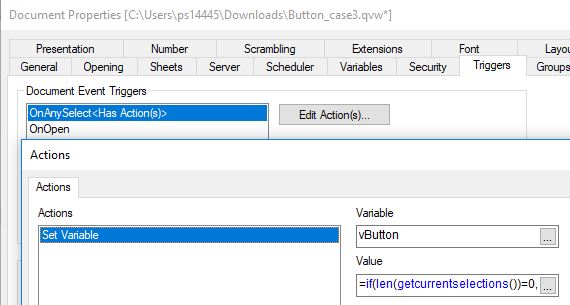
rkpatelqlikview
- Mark as New
- Bookmark
- Subscribe
- Mute
- Subscribe to RSS Feed
- Permalink
- Report Inappropriate Content
Now i did it.
If(len(getselectedcount())>0, RGB(0, 0, 255), RGB(192, 192, 192))
rkpatelqlikview
- Mark as New
- Bookmark
- Subscribe
- Mute
- Subscribe to RSS Feed
- Permalink
- Report Inappropriate Content
=if(len(GetCurrentSelections())=0,RGB(0, 0, 255), RGB(192, 192, 192))
tresB
- Mark as New
- Bookmark
- Subscribe
- Mute
- Subscribe to RSS Feed
- Permalink
- Report Inappropriate Content
Please realize that this trigger doesn't set the color of the button directly, it only sets the variable value. So try just this:
=if(len(GetCurrentSelections())=0, 0)
Button's color changes based on it's status, 'active' or 'inactive'.
rkpatelqlikview
- Mark as New
- Bookmark
- Subscribe
- Mute
- Subscribe to RSS Feed
- Permalink
- Report Inappropriate Content
sorry Tresesco,
Your QVW is working properly. But when am implementing the same things in application its not working.
Thanks in advance
rkpatelqlikview
- Mark as New
- Bookmark
- Subscribe
- Mute
- Subscribe to RSS Feed
- Permalink
- Report Inappropriate Content
PFA !
tresB
- Mark as New
- Bookmark
- Subscribe
- Mute
- Subscribe to RSS Feed
- Permalink
- Report Inappropriate Content
Interesting!
It seems that since your sample app is not having any data (read - field to check for clearance->OnAnySelect), qlik is probably not even triggering the OnAnySelect action assuming that there is nothing to clear. However, if you try with a dummy field loaded or try in the real application (which must be having data), this will work.

- « Previous Replies
-
- 1
- 2
- Next Replies »