Unlock a world of possibilities! Login now and discover the exclusive benefits awaiting you.

- Qlik Community
- :
- All Forums
- :
- QlikView
- :
- How to combine multiples/filter?
- Subscribe to RSS Feed
- Mark Topic as New
- Mark Topic as Read
- Float this Topic for Current User
- Bookmark
- Subscribe
- Mute
- Printer Friendly Page

- Mark as New
- Bookmark
- Subscribe
- Mute
- Subscribe to RSS Feed
- Permalink
- Report Inappropriate Content
How to combine multiples/filter?
So I'm relatively new to coding entirely..
My dashboard has many users, which have many courses we enroll them in. Sometimes their courses may be cancelled, be dropped, but what I want to see is, if they completed it, it is all irreverent. For example:
Steve Intro to Medical Terminology Completed
Steve Intro to Medical Terminology Open
James Body Systems Dropped
James Intro to Medical Teminology Dropped
Karen Intro to Medical Terminology Completed
So if I am trying to pull up a report, and I want to see who has completed "Intro to Med Terms," it should only be Steve and Karen. The code I have been using is:
Max(Count(Course_Status="completed",1,0))
Any advice?
Accepted Solutions

 sunny_talwar
- Mark as New
- Bookmark
- Subscribe
- Mute
- Subscribe to RSS Feed
- Permalink
- Report Inappropriate Content
Try this as your calculated dimension:
=Aggr(If(SubStringCount(Concat(DISTINCT [Course Status], '|'), 'complete') = 1, 'complete', [Course Status]), Course)

sunny_talwar
- Mark as New
- Bookmark
- Subscribe
- Mute
- Subscribe to RSS Feed
- Permalink
- Report Inappropriate Content
You can also use set analysis for this:
to list the names
=Concat(DISTINCT {<Name = p({<CourseStatus = {'Completed'}>})>}Name, ', ')
to count the names
=Count(DISTINCT {<Name = p({<CourseStatus = {'Completed'}>})>}Name)

sunny_talwar
- Mark as New
- Bookmark
- Subscribe
- Mute
- Subscribe to RSS Feed
- Permalink
- Report Inappropriate Content
Or like this in a straight table:
 !
!
- Mark as New
- Bookmark
- Subscribe
- Mute
- Subscribe to RSS Feed
- Permalink
- Report Inappropriate Content
I definitely appreciate the quick reply, but maybe I should clarify a bit.
My current qlikview displays:
Hospital Name Email Course Course Status Program Enroll Program Complete
TX James *** 1 complete 11/12 12/11
TX James *** 1 complete 11/12 12/11
TX James *** 1 open 11/12 12/11
TX James *** 2 complete 11/12 12/11
TX James *** 2 dropped 11/12 12/11
TX James *** 3 open 11/12 12/11
So I am trying to combine all like courses to see what their status is as completed being prefered. For example:
Hospital Name Email Course Course Status Program Enroll Program Complete
TX James *** 1 complete 11/12 12/11
TX James *** 2 complete 11/12 12/11
TX James *** 3 open 11/12 12/11
So I have been trying to put this in the properties table, as a conditional dimension.
See how green I am in all of this?
 maxgro
- Mark as New
- Bookmark
- Subscribe
- Mute
- Subscribe to RSS Feed
- Permalink
- Report Inappropriate Content
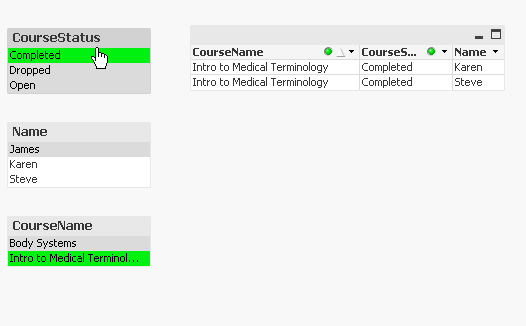
I suggest to
- add a tablebox with all your fields
- add 3 listbox
and then start clicking on the listbox to filter and get the result you want, just click on Completed and Intro to......
- Mark as New
- Bookmark
- Subscribe
- Mute
- Subscribe to RSS Feed
- Permalink
- Report Inappropriate Content
Thanks Max, I have incorporated those options, however as in my reply to Sunny, there comes the case where there are multiple status entries, and I am trying to combine those entries.
sunny_talwar
- Mark as New
- Bookmark
- Subscribe
- Mute
- Subscribe to RSS Feed
- Permalink
- Report Inappropriate Content
Try this as your calculated dimension:
=Aggr(If(SubStringCount(Concat(DISTINCT [Course Status], '|'), 'complete') = 1, 'complete', [Course Status]), Course)
- Mark as New
- Bookmark
- Subscribe
- Mute
- Subscribe to RSS Feed
- Permalink
- Report Inappropriate Content
Perfect, thank you very much!
sunny_talwar
- Mark as New
- Bookmark
- Subscribe
- Mute
- Subscribe to RSS Feed
- Permalink
- Report Inappropriate Content
Not a problem. I am glad I was able to help 
Best,
Sunny