Unlock a world of possibilities! Login now and discover the exclusive benefits awaiting you.

- Qlik Community
- :
- All Forums
- :
- QlikView
- :
- How to compare fields
Options
- Subscribe to RSS Feed
- Mark Topic as New
- Mark Topic as Read
- Float this Topic for Current User
- Bookmark
- Subscribe
- Mute
- Printer Friendly Page
Turn on suggestions
Auto-suggest helps you quickly narrow down your search results by suggesting possible matches as you type.
Showing results for

Anonymous
Not applicable
2017-07-11
09:17 AM
- Mark as New
- Bookmark
- Subscribe
- Mute
- Subscribe to RSS Feed
- Permalink
- Report Inappropriate Content
How to compare fields
Guys,
In the below screenshot, I have two customers A and B with having some number of fields each.
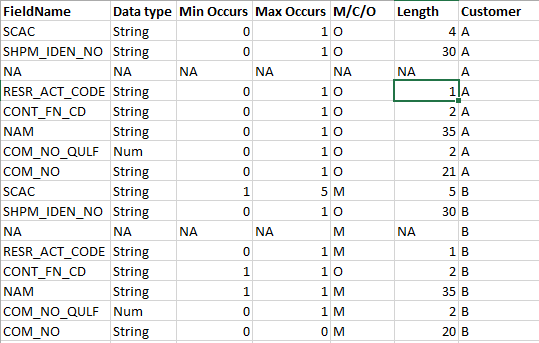
1. When customer A is selected in list-box,I want to show a bar chart with having the fields exactly matched with customer B
2. The selected customer (A) need not be shown in bar chart. If selected customer's fields exactly matches with customer B, that matched field count alone for customer B should be shown.
How can I achieve this... Plz anyone help me guys.
Regards,
Siva
5,021 Views
- « Previous Replies
- Next Replies »
20 Replies
Anonymous
Not applicable
2017-07-12
09:45 AM
Author
- Mark as New
- Bookmark
- Subscribe
- Mute
- Subscribe to RSS Feed
- Permalink
- Report Inappropriate Content
Okay thanks. It's working fine for normal bar chart but I'll let you know once I got this for grouped bar chart too.
- « Previous Replies
- Next Replies »