Unlock a world of possibilities! Login now and discover the exclusive benefits awaiting you.

- Qlik Community
- :
- All Forums
- :
- QlikView
- :
- How to compute Average Stock ( Base on Jan 2015 Op...
- Subscribe to RSS Feed
- Mark Topic as New
- Mark Topic as Read
- Float this Topic for Current User
- Bookmark
- Subscribe
- Mute
- Printer Friendly Page

 paulyeo11
- Mark as New
- Bookmark
- Subscribe
- Mute
- Subscribe to RSS Feed
- Permalink
- Report Inappropriate Content
How to compute Average Stock ( Base on Jan 2015 Open Stock )
Hi All
I need to compute :-
when at Jan 2015 , Average Stock = 1 ( 1+1)/2=1 , which is Jan Open Stock + Jan Close Stock.
when at Feb 2015 , Average Stock = 1 ( 1+2)/2=1.5 , which is Jan Open Stock + Feb Close Stock.
..
..
when at Dec 2015 , Average Stock = 1 ( 1+12)/2=6.5 , which is Jan Open Stock + Dec Close Stock.
May i know how to do ?
Now my result on Average Stock is wrong.
Enclosed my QV Doc
Paul
- Tags:
- qlikview_scripting
- « Previous Replies
-
- 1
- 2
- Next Replies »
Accepted Solutions

 sunny_talwar
- Mark as New
- Bookmark
- Subscribe
- Mute
- Subscribe to RSS Feed
- Permalink
- Report Inappropriate Content
This?
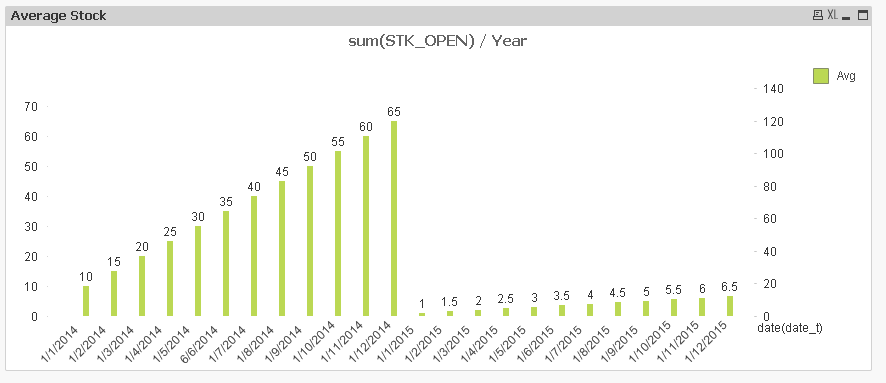
Expression:
If(sum(STK_CLOSE) > 0 and sum(STK_OPEN) > 0,
RangeAvg(Aggr(Sum({<month>}TOTAL <year> If([date(date_t)] = YearStart([date(date_t)]), STK_OPEN)), [date(date_t)], year), sum({<month>}STK_CLOSE)))
sunny_talwar
- Mark as New
- Bookmark
- Subscribe
- Mute
- Subscribe to RSS Feed
- Permalink
- Report Inappropriate Content
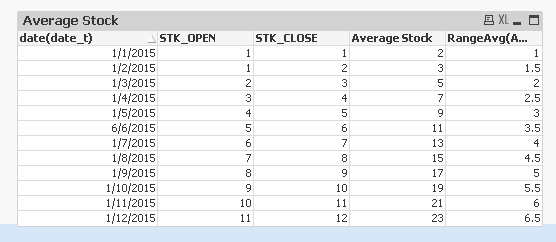
Try this expression:
RangeAvg(Above(Sum(STK_CLOSE), (RowNo() - 1)), sum(STK_OPEN))
RangeAvg(Above(Sum(STK_OPEN), (RowNo() - 1)), sum(STK_CLOSE))

 swuehl
- Mark as New
- Bookmark
- Subscribe
- Mute
- Subscribe to RSS Feed
- Permalink
- Report Inappropriate Content
Try as expression
(Column(2)+Top(Column(1)) )/2
Top() will evaluate Column(1) in the context of the top dimensional row, i.e, Jan in your case.
swuehl
- Mark as New
- Bookmark
- Subscribe
- Mute
- Subscribe to RSS Feed
- Permalink
- Report Inappropriate Content
Another alternative would be to calculate the jan stock using set analysis:
(Column(2)+sum(TOTAL {<[date(date_t)] = {'1/1/2015'}>}STK_OPEN) )/2
 tresB
tresB
- Mark as New
- Bookmark
- Subscribe
- Mute
- Subscribe to RSS Feed
- Permalink
- Report Inappropriate Content
(Column(2)+sum(total {<[date(date_t)]={'1/1/2015'}>}STK_OPEN))/2

- Mark as New
- Bookmark
- Subscribe
- Mute
- Subscribe to RSS Feed
- Permalink
- Report Inappropriate Content
like this?
paulyeo11
- Mark as New
- Bookmark
- Subscribe
- Mute
- Subscribe to RSS Feed
- Permalink
- Report Inappropriate Content
Hi All
Thank you so much for all your help.
Now i like to create expression using SET.
Meaning if i select month = 6 , i need the Average stock display as 3.5. , which is correct.
How to do it ?
As Now when i select month = 6 , it display 5.5
which is wrong.
Paul
swuehl
- Mark as New
- Bookmark
- Subscribe
- Mute
- Subscribe to RSS Feed
- Permalink
- Report Inappropriate Content
The version with set analysis should work:
(Column(2)+sum(TOTAL {<[date(date_t)] = {'1/1/2015'}>}STK_OPEN) )/2
returns 3.5 when selecting june.
paulyeo11
- Mark as New
- Bookmark
- Subscribe
- Mute
- Subscribe to RSS Feed
- Permalink
- Report Inappropriate Content
Hi Sir
Now i like to create expression using SET.
Meaning if i select month = 6 , i need the Average stock display as 3.5. , which is correct.
How to do it ?
As Now when i select month = 6 , it display 3
which is wrong.
I also notice that the expression below :-
(Column(2)+sum(TOTAL {<[date(date_t)] = {'1/1/2015'}>}STK_OPEN) )/2
How to make 1/1/2015 change to 1/1/2014 , when i select year = 2014.
Paul
- Mark as New
- Bookmark
- Subscribe
- Mute
- Subscribe to RSS Feed
- Permalink
- Report Inappropriate Content
modify this :
(Column(2)+sum(TOTAL {<[date(date_t)] = {'1/1/2015'}>}STK_OPEN) )/2
with it:
(Column(2)+sum(TOTAL {<[date(date_t)] = {'=$(=date(min(DateField)))'}>}STK_OPEN) )/2
- « Previous Replies
-
- 1
- 2
- Next Replies »