Unlock a world of possibilities! Login now and discover the exclusive benefits awaiting you.

- Qlik Community
- :
- All Forums
- :
- QlikView
- :
- How to convert Time into millisecond
- Subscribe to RSS Feed
- Mark Topic as New
- Mark Topic as Read
- Float this Topic for Current User
- Bookmark
- Subscribe
- Mute
- Printer Friendly Page

- Mark as New
- Bookmark
- Subscribe
- Mute
- Subscribe to RSS Feed
- Permalink
- Report Inappropriate Content
How to convert Time into millisecond
Dear All, i want to know how to convert Time "00:00:00.000" to Millisecond. Ex : if time difference of two time 11:00:00.010 - 11:00:01.020 = 00:00:01.010. i want to show it as 1010 Please help
Accepted Solutions

 Gysbert_Wassena
- Mark as New
- Bookmark
- Subscribe
- Mute
- Subscribe to RSS Feed
- Permalink
- Report Inappropriate Content
=Interval(Time#('11:00:01.020','hh:mm:ss.fff')-Time#('11:00:00.010','hh:mm:ss.fff'),'sfff')
talk is cheap, supply exceeds demand
Gysbert_Wassena- Mark as New
- Bookmark
- Subscribe
- Mute
- Subscribe to RSS Feed
- Permalink
- Report Inappropriate Content
=Interval(Time#('11:00:01.020','hh:mm:ss.fff')-Time#('11:00:00.010','hh:mm:ss.fff'),'sfff')
talk is cheap, supply exceeds demand
- Mark as New
- Bookmark
- Subscribe
- Mute
- Subscribe to RSS Feed
- Permalink
- Report Inappropriate Content
Thanks Gysbert
- Mark as New
- Bookmark
- Subscribe
- Mute
- Subscribe to RSS Feed
- Permalink
- Report Inappropriate Content
instead of Interval() if i use Timestamp() then also its working.. then what is different between these two...
Gysbert_Wassena- Mark as New
- Bookmark
- Subscribe
- Mute
- Subscribe to RSS Feed
- Permalink
- Report Inappropriate Content
The difference is that timestamp is a point in time, not an duration between two points in time. You can see this if you make a timestamp out of 26 hours. Try these two in text boxes:
=interval(26/24,'hh')
=timestamp(26/24,'hh')
talk is cheap, supply exceeds demand

 MarcoWedel
- Mark as New
- Bookmark
- Subscribe
- Mute
- Subscribe to RSS Feed
- Permalink
- Report Inappropriate Content
For sorting purposses you might also wish to try the expression:
=(Time#('11:00:01.020','hh:mm:ss.fff')-Time#('11:00:00.010','hh:mm:ss.fff'))*86400000
Hope this helps
Regards
Marco
- Mark as New
- Bookmark
- Subscribe
- Mute
- Subscribe to RSS Feed
- Permalink
- Report Inappropriate Content
Thanks 🙂
MarcoWedel
- Mark as New
- Bookmark
- Subscribe
- Mute
- Subscribe to RSS Feed
- Permalink
- Report Inappropriate Content
You're welcome.
Regards
Marco
MarcoWedel
- Mark as New
- Bookmark
- Subscribe
- Mute
- Subscribe to RSS Feed
- Permalink
- Report Inappropriate Content
Hi,
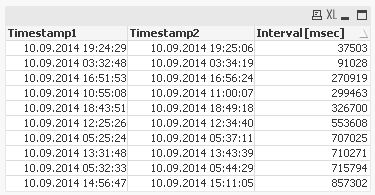
I noticed some effects due to the limited resolution of real values, so the result has to be converted to an integer:
=Round((Time#('11:00:01.020','hh:mm:ss.fff')-Time#('11:00:00.010','hh:mm:ss.fff'))*86400000)
hope this helps
regards
Marco