Unlock a world of possibilities! Login now and discover the exclusive benefits awaiting you.

- Qlik Community
- :
- All Forums
- :
- QlikView
- :
- How to create a Drill With Costomize Dimension -Ur...
- Subscribe to RSS Feed
- Mark Topic as New
- Mark Topic as Read
- Float this Topic for Current User
- Bookmark
- Subscribe
- Mute
- Printer Friendly Page

 brijeshvma
- Mark as New
- Bookmark
- Subscribe
- Mute
- Subscribe to RSS Feed
- Permalink
- Report Inappropriate Content
How to create a Drill With Costomize Dimension -Urgent
Hi All i have Column Like
Filter, Action, VisitID.
In Action i Have Apartment_Types and Price Range Values
and in Filter i have filter value that customer selected for Apartment Types and Price Range .
Say Example ,
For Apartment associate data are like
[1],
[1,2,3]
["3",1,2,3,4,5]
and in Price Range say,
{"Max":1}
{"Max":"2500000","Min":"500000"}
I wan to Create a Bar Chart in that i want Drill say Example ..
Intially It will show Apartment types and Price range and Measures Will be Count( Distinct VisitID)
But When User Drill the Apartment Types he can See
Dimension as 1BHK ,2BHK,3BHK,4BHK,5BHK.
and Count of Selection as per user .. Means if Data is [1,2,3,4].. it gives count 1 for all BHK Except 5BHK and Like that..
and Second if User Drill Price Range
it shows Dimension 0-25L ,25-50L ,50-75L and more..
Means {"Max":"2500000","Min":"500000"} will Count 1 for 0-25L Price Ranage...
Kindly help me for the same
- « Previous Replies
-
- 1
- 2
- Next Replies »
brijeshvma
- Mark as New
- Bookmark
- Subscribe
- Mute
- Subscribe to RSS Feed
- Permalink
- Report Inappropriate Content
Hi All ,
I am not able to create any idea to come with the output .
Can u please suggest me any update on this

 amayuresh
- Mark as New
- Bookmark
- Subscribe
- Mute
- Subscribe to RSS Feed
- Permalink
- Report Inappropriate Content
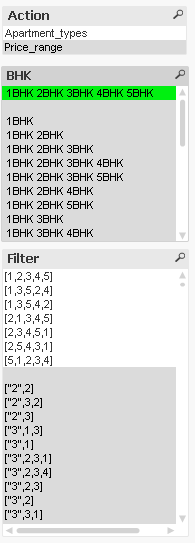
This will help you to identify the BHK requirement.
Add below line in your script:

Output:
brijeshvma
- Mark as New
- Bookmark
- Subscribe
- Mute
- Subscribe to RSS Feed
- Permalink
- Report Inappropriate Content
Hi Mayuresh ,
Thanks for ur reply...but I needed something different..
If should display 1BHK , 2 BHK and further...if input is
[1,2,3,4,5] ...is should it count 1 in All BHK...
amayuresh
- Mark as New
- Bookmark
- Subscribe
- Mute
- Subscribe to RSS Feed
- Permalink
- Report Inappropriate Content
Please elaborate your requirement in details with example.
brijeshvma
- Mark as New
- Bookmark
- Subscribe
- Mute
- Subscribe to RSS Feed
- Permalink
- Report Inappropriate Content
Hi,
Just check my qvw ..
first look I should bar chart as Action Dimension.
Values are Apartment types and Price range
If user drill the Apartment types .it should show..
1BHK ,2 BHK ,3 BHK , 4 BHK ,5 BHk...
When user go to website and check the filter for Apartment types and say he selected 1,2,3 BHK option
So we get data like [ 1,2,3]. It means in 1 BHK stack count will be 1 in 2 BHK stack will be 1 Count and same for 3...in ur solution it will show combined 1BHK2BHK3BHK stack...but it should show seperate
amayuresh
- Mark as New
- Bookmark
- Subscribe
- Mute
- Subscribe to RSS Feed
- Permalink
- Report Inappropriate Content
Output:
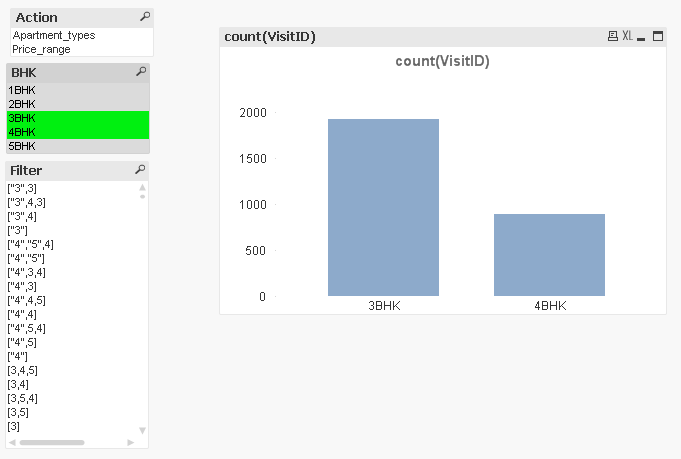
Script : Use this line in script for separate BHK

brijeshvma
- Mark as New
- Bookmark
- Subscribe
- Mute
- Subscribe to RSS Feed
- Permalink
- Report Inappropriate Content
Hi Mayuresh,
its not giving a Proper Answer..
if data is ["2",3,1] is showing 3 BHK ... But it should show 1 for 2 BHK , 3BHK , 1BHK..
brijeshvma
- Mark as New
- Bookmark
- Subscribe
- Mute
- Subscribe to RSS Feed
- Permalink
- Report Inappropriate Content
Can anyone please suggest me on this as well
brijeshvma
- Mark as New
- Bookmark
- Subscribe
- Mute
- Subscribe to RSS Feed
- Permalink
- Report Inappropriate Content

- « Previous Replies
-
- 1
- 2
- Next Replies »