Unlock a world of possibilities! Login now and discover the exclusive benefits awaiting you.

- Qlik Community
- :
- All Forums
- :
- QlikView
- :
- Re: How to create a customize filter/selection/lis...
- Subscribe to RSS Feed
- Mark Topic as New
- Mark Topic as Read
- Float this Topic for Current User
- Bookmark
- Subscribe
- Mute
- Printer Friendly Page

 jim_chan
- Mark as New
- Bookmark
- Subscribe
- Mute
- Subscribe to RSS Feed
- Permalink
- Report Inappropriate Content
How to create a customize filter/selection/listbox
Hi guys,
i have created a pivot table. in my correctio column, actually consists of value C,D.
But my client wants to have a selection box which can give the client a choice of choosing view "C Only", "D Only", "C & D" , "All".
So, i do not know how to create this filter. I have tried to create in the script editor as such:
if(correctio_tip = 'c', 'C',
if(correction_tip='d','D',
if(correction_tip='c' or 'd', 'C & D')))
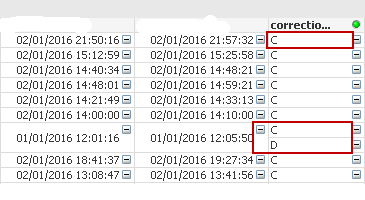
Help help help 
Rgds
Jim
- « Previous Replies
- Next Replies »
jim_chan
- Mark as New
- Bookmark
- Subscribe
- Mute
- Subscribe to RSS Feed
- Permalink
- Report Inappropriate Content
Hello Manuel,
i have used this script too. Now i do not know should i group by few more fields or just group by cust_id. i have selected "C&D" but.. it is still listing all out.
Unlike your sample  thats amazing. that;s what i am looking for...
LEFT JOIN Competition
LOAD
cust_id,
concat(DISTINCT correctio_tip,'&') as MyField2
RESIDENT Competition
//if you want, you can add more fields to group, like categories or dates
GROUP BY cust_id;
MyFilter:
LOAD DISTINCT MyField2 as MyFilter RESIDENT Competition;
CONCATENATE
LOAD 'All' as MyFilter AUTOGENERATE 1;


- Mark as New
- Bookmark
- Subscribe
- Mute
- Subscribe to RSS Feed
- Permalink
- Report Inappropriate Content
Hi Jim:
If you want to add more fields on group by, yo need to include it on LOAD:
LEFT JOIN Competition
LOAD
cust_id,
date,
starttime
concat(DISTINCT correctio_tip,'&') as MyField2
RESIDENT Competition
//if you want, you can add more fields to group, like categories or dates
GROUP BY cust_id, date, starttime;
MyFilter:
LOAD DISTINCT MyField2 as MyFilter RESIDENT Competition;
CONCATENATE
LOAD 'All' as MyFilter AUTOGENERATE 1;
Regards!!!
jim_chan
- Mark as New
- Bookmark
- Subscribe
- Mute
- Subscribe to RSS Feed
- Permalink
- Report Inappropriate Content
can I ask a stupid question ? why when i add Group by date, starttime, i need to include it in the Load as well?
jim_chan
- Mark as New
- Bookmark
- Subscribe
- Mute
- Subscribe to RSS Feed
- Permalink
- Report Inappropriate Content
Thanks alot Manuel, you have finally resolved my problem haha!
- Mark as New
- Bookmark
- Subscribe
- Mute
- Subscribe to RSS Feed
- Permalink
- Report Inappropriate Content
Hi Jim, all fields included on group by must be on load.
I am glad to help you.
Regards!!
- « Previous Replies
- Next Replies »