Unlock a world of possibilities! Login now and discover the exclusive benefits awaiting you.

- Qlik Community
- :
- All Forums
- :
- QlikView
- :
- How to do calculated dimensional sort
- Subscribe to RSS Feed
- Mark Topic as New
- Mark Topic as Read
- Float this Topic for Current User
- Bookmark
- Subscribe
- Mute
- Printer Friendly Page

- Mark as New
- Bookmark
- Subscribe
- Mute
- Subscribe to RSS Feed
- Permalink
- Report Inappropriate Content
How to do calculated dimensional sort
I have a calculated dimension as said below
if(points>0, if((Last_bill_date-first_bill_date)<30,'<30',if((Last_bill_date-first_bill_date)<60,'30-60'))
I need to sort this like
<30
30-60 and on....
Can anybody please help me on the same.

 sunny_talwar
- Mark as New
- Bookmark
- Subscribe
- Mute
- Subscribe to RSS Feed
- Permalink
- Report Inappropriate Content
Update: Try sorting by Avg(Last_bill_date-first_bill_date)
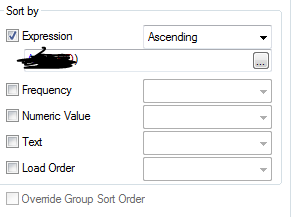
Have you tried sorting it by Last_bill_date-first_bill_date?
Best,
S
sunny_talwar
- Mark as New
- Bookmark
- Subscribe
- Mute
- Subscribe to RSS Feed
- Permalink
- Report Inappropriate Content
The idea is the when you sort by the Avg(Last_bill_date-first_bill_date), it will be in the same order as the ranges itself: so average of <30 would also be below 30 and average of 30-60 would be between those two numbers.
Hope this is what you want to do.
Best,
S

 manojkulkarni
- Mark as New
- Bookmark
- Subscribe
- Mute
- Subscribe to RSS Feed
- Permalink
- Report Inappropriate Content
Calculated dimension is not necessary, then you could put this logic in load script. Sorting can be handled easily. Another part of it is , calculated dimensions will consume more time than normal fields