Unlock a world of possibilities! Login now and discover the exclusive benefits awaiting you.

- Qlik Community
- :
- All Forums
- :
- QlikView
- :
- How to get Transparant look for objects like List ...
- Subscribe to RSS Feed
- Mark Topic as New
- Mark Topic as Read
- Float this Topic for Current User
- Bookmark
- Subscribe
- Mute
- Printer Friendly Page

 jblomqvist
- Mark as New
- Bookmark
- Subscribe
- Mute
- Subscribe to RSS Feed
- Permalink
- Report Inappropriate Content
How to get Transparant look for objects like List Boxes when using Advanced Styling Mode?
Hi all,
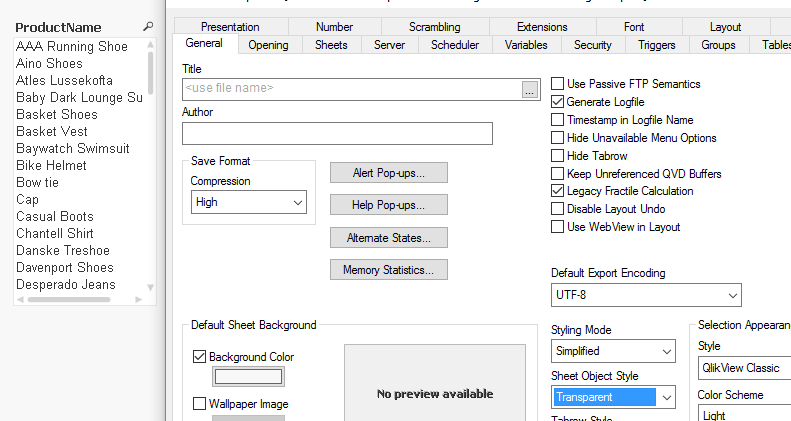
I am currently using Simplified Styling Mode and Transparant object style like below, you can see the List Box has a 'transparant' look:
I have to use Advanced Styling mode for some other objects but it messed up my Listboxes like below:
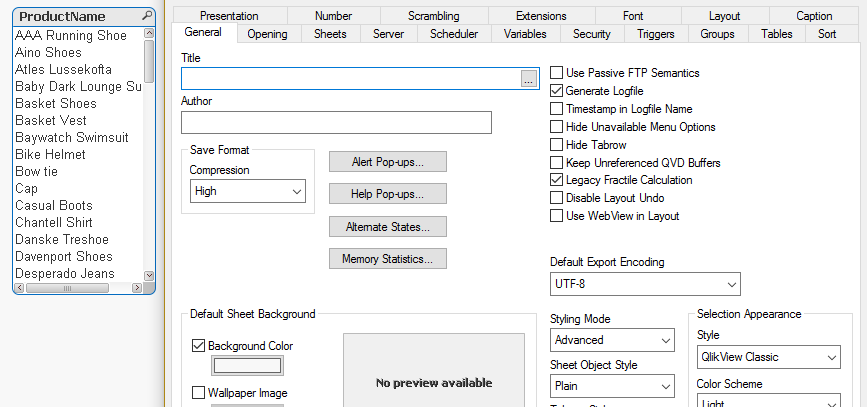
Does anyone know how to get the List Boxes etc to have transparant look when using Advanced styling mode? 
It's annoying the Sheet Object Style does not have Transparant option when using Advanced mode.

 marcus_sommer
- Mark as New
- Bookmark
- Subscribe
- Mute
- Subscribe to RSS Feed
- Permalink
- Report Inappropriate Content
Within the layout- and title-tab you could adjust the options to the borders, scrollbars and title. If you had done to one listbox you could copy these layout-options to all other listboxes like in MS office with the brush-icon.
- Marcus
