Unlock a world of possibilities! Login now and discover the exclusive benefits awaiting you.

Announcements
Share your agentic AI experience, learn from others, and earn a new badge: Put Agentic AI to Work
- Qlik Community
- :
- All Forums
- :
- QlikView
- :
- How to make Hierarchy In Qlikview
Options
- Subscribe to RSS Feed
- Mark Topic as New
- Mark Topic as Read
- Float this Topic for Current User
- Bookmark
- Subscribe
- Mute
- Printer Friendly Page
Turn on suggestions
Auto-suggest helps you quickly narrow down your search results by suggesting possible matches as you type.
Showing results for

Not applicable
2012-09-28
09:13 AM
- Mark as New
- Bookmark
- Subscribe
- Mute
- Subscribe to RSS Feed
- Permalink
- Report Inappropriate Content
How to make Hierarchy In Qlikview
Hi All,
I have a data set as shown below.
I want to make a tree structure by using Hierarchy function in QV
| RegionName | StateName | CityName |
| NORTH | Delhi | Delhi |
| NORTH | Haryana | Gurgaon |
| SOUTH | PONDICHERRY | Pondicherry |
| SOUTH | TAMIL NADU | Chennai |
| SOUTH | TAMIL NADU | Villupuram |
| WEST | GUJARAT | Surat |
| WEST | Maharashtra | Kalyan-Dombivli (M Corp.) |
| WEST | Maharashtra | Pune |
Please help me.
- « Previous Replies
-
- 1
- 2
- Next Replies »
10 Replies
Not applicable
2015-07-26
09:54 AM
Author
- Mark as New
- Bookmark
- Subscribe
- Mute
- Subscribe to RSS Feed
- Permalink
- Report Inappropriate Content
Hi Abhishek,
When You said like below:
I can make this structure by righting an expression on a list box like this
=RegionName &' /' & StateName & '/' & CityName and then by checking the Tree View option
But i tried with the same expression as you mentioned it is showing some extra tree and default selection
Give me the possible way to remove the extra tree
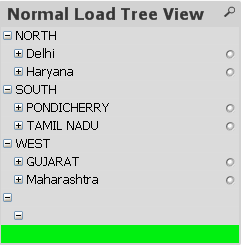
Regards,
Chaithu
529 Views
- « Previous Replies
-
- 1
- 2
- Next Replies »