Unlock a world of possibilities! Login now and discover the exclusive benefits awaiting you.

- Qlik Community
- :
- All Forums
- :
- QlikView
- :
- How to pick the most recent month ?
- Subscribe to RSS Feed
- Mark Topic as New
- Mark Topic as Read
- Float this Topic for Current User
- Bookmark
- Subscribe
- Mute
- Printer Friendly Page

- Mark as New
- Bookmark
- Subscribe
- Mute
- Subscribe to RSS Feed
- Permalink
- Report Inappropriate Content
How to pick the most recent month ?
PFA Sample QVW.How to pick the most recent month for each ID?
Thanks much.
Accepted Solutions

 sunny_talwar
- Mark as New
- Bookmark
- Subscribe
- Mute
- Subscribe to RSS Feed
- Permalink
- Report Inappropriate Content
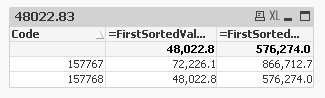
A slightly different way to assign numerical value to month:
=FirstSortedValue(Aggr(Sum(Amount), [Invoice Month], Code), -Aggr(Max(Date#([Invoice Month], 'MMM')), [Invoice Month], Code)) * 12

 pk2019
- Mark as New
- Bookmark
- Subscribe
- Mute
- Subscribe to RSS Feed
- Permalink
- Report Inappropriate Content
 Gysbert_Wassena
- Mark as New
- Bookmark
- Subscribe
- Mute
- Subscribe to RSS Feed
- Permalink
- Report Inappropriate Content
Try:
=FirstSortedValue( aggr(sum(Amount),[Invoice Month],Code), aggr(-max(match([Invoice Month], 'Jan','Feb','Mar','Apr','May','Jun','Jul','Aug','Sep','Oct','Nov','Dec') ),[Invoice Month],Code))*12
Alternatively replace your textual month field with a field that has a numeric value. That way you can replace the max(match(... )) construction with the name of the numeric field.
talk is cheap, supply exceeds demand
sunny_talwar
- Mark as New
- Bookmark
- Subscribe
- Mute
- Subscribe to RSS Feed
- Permalink
- Report Inappropriate Content
A slightly different way to assign numerical value to month:
=FirstSortedValue(Aggr(Sum(Amount), [Invoice Month], Code), -Aggr(Max(Date#([Invoice Month], 'MMM')), [Invoice Month], Code)) * 12