Unlock a world of possibilities! Login now and discover the exclusive benefits awaiting you.

- Qlik Community
- :
- All Forums
- :
- QlikView
- :
- How to remove special character?
- Subscribe to RSS Feed
- Mark Topic as New
- Mark Topic as Read
- Float this Topic for Current User
- Bookmark
- Subscribe
- Mute
- Printer Friendly Page

 soha1902
- Mark as New
- Bookmark
- Subscribe
- Mute
- Subscribe to RSS Feed
- Permalink
- Report Inappropriate Content
How to remove special character?
Hi All,
I want to remove last two character from my field.
I know, I need to use PurgeChar() but the problem is, I don't know how to type this character.
Please find below image for clarification.
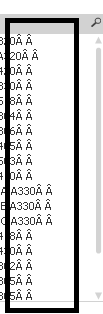
Please help me regarding this.
Accepted Solutions

 tresB
tresB
- Mark as New
- Bookmark
- Subscribe
- Mute
- Subscribe to RSS Feed
- Permalink
- Report Inappropriate Content
To exclude last two chararcters, try like:
=Left('ABCDE',Len('ABCDE')-2)
You can replace ABCDE by your field name.
tresB
- Mark as New
- Bookmark
- Subscribe
- Mute
- Subscribe to RSS Feed
- Permalink
- Report Inappropriate Content
To exclude last two chararcters, try like:
=Left('ABCDE',Len('ABCDE')-2)
You can replace ABCDE by your field name.
 its_anandrjs
- Mark as New
- Bookmark
- Subscribe
- Mute
- Subscribe to RSS Feed
- Permalink
- Report Inappropriate Content
You can try like below load script if in the fields it is last 2 words
Load
Mid(FieldName,1,len(FieldName)-2) as Newfield
From Location;
Or you can use purge char also.
See the small example
LOAD Site,Word, mid(Word,1,len(Word)-2) as NewWord;
LOAD * Inline
[
Site,Word
a,23fd
b,45fdsf
c,3fsdf
d,56fdsf
e,566fsdf
];
And you get in field NewWord
| 23 |
| 3fs |
| 56fd |
| 566fs |
| 45fd |
