Unlock a world of possibilities! Login now and discover the exclusive benefits awaiting you.

- Qlik Community
- :
- All Forums
- :
- QlikView
- :
- How to set Different Background Colors for Dimensi...
- Subscribe to RSS Feed
- Mark Topic as New
- Mark Topic as Read
- Float this Topic for Current User
- Bookmark
- Subscribe
- Mute
- Printer Friendly Page

 vinayakg
- Mark as New
- Bookmark
- Subscribe
- Mute
- Subscribe to RSS Feed
- Permalink
- Report Inappropriate Content
How to set Different Background Colors for Dimensions and Measures in Qlikview
Hi All,
how to give different colors for Dimension and Measures column Headers in qlikview...Please help me to do this.
Thanks in Advance


- Mark as New
- Bookmark
- Subscribe
- Mute
- Subscribe to RSS Feed
- Permalink
- Report Inappropriate Content
You need to apply custom cells using Ctrl + G.. More info.. available in Help if you search for "Custom Format Cell"

- Mark as New
- Bookmark
- Subscribe
- Mute
- Subscribe to RSS Feed
- Permalink
- Report Inappropriate Content
Hi,
Go to Setting >> User Setting >> Design >> on bottom right >> there is a check box - Always show design menu (check this box).
Then right click on your table & select >> Custom format cell >> you can fix there whatever color you want to set.
- Mark as New
- Bookmark
- Subscribe
- Mute
- Subscribe to RSS Feed
- Permalink
- Report Inappropriate Content
vinayakg
- Mark as New
- Bookmark
- Subscribe
- Mute
- Subscribe to RSS Feed
- Permalink
- Report Inappropriate Content
Hi Anil,
I tried this but not getting the required output
Thank u
vinayakg
- Mark as New
- Bookmark
- Subscribe
- Mute
- Subscribe to RSS Feed
- Permalink
- Report Inappropriate Content
Hi Anil Kumar,
But it's applying to all headers...
- Mark as New
- Bookmark
- Subscribe
- Mute
- Subscribe to RSS Feed
- Permalink
- Report Inappropriate Content
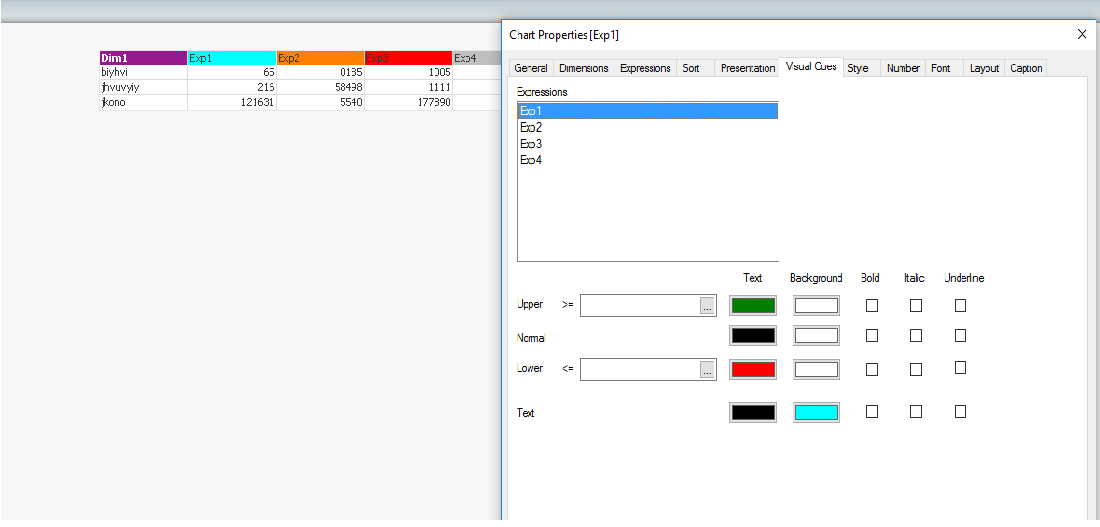
If you are using a dinamic table, can alter the colors like this.
But, if you would have null data in some cell, this cell will be colored with the same color as you chose in the header.