Unlock a world of possibilities! Login now and discover the exclusive benefits awaiting you.

Announcements
Share your agentic AI experience, learn from others, and earn a new badge: Put Agentic AI to Work
- Qlik Community
- :
- All Forums
- :
- QlikView
- :
- How to sum the value for specific date range?
Options
- Subscribe to RSS Feed
- Mark Topic as New
- Mark Topic as Read
- Float this Topic for Current User
- Bookmark
- Subscribe
- Mute
- Printer Friendly Page
Turn on suggestions
Auto-suggest helps you quickly narrow down your search results by suggesting possible matches as you type.
Showing results for

Anonymous
Not applicable
2018-05-01
12:04 PM
- Mark as New
- Bookmark
- Subscribe
- Mute
- Subscribe to RSS Feed
- Permalink
- Report Inappropriate Content
How to sum the value for specific date range?
Hello Anyone;
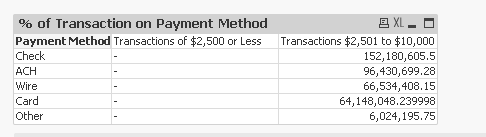
I am attempting to get values sorted by payment type for a range per the chart below.
I am not sure if i should be using a set analysis or not. Below is the function i am using to try and get transactions from 0 - 2500, however I keep getting nothing back. 2501 to 10000 is just a sum([Amt Paid]). Can anyone point me in the right direction?
Thank you in advance for any assistance.
=If([Amt Paid] >= 0 and [Amt Paid] <= 2500, sum([Amt Paid]))
1,297 Views
1 Solution
Accepted Solutions

 Digvijay_Singh
MVP
2018-05-01
12:07 PM
- Mark as New
- Bookmark
- Subscribe
- Mute
- Subscribe to RSS Feed
- Permalink
- Report Inappropriate Content
1,256 Views
3 Replies
Digvijay_Singh
MVP
2018-05-01
12:07 PM
- Mark as New
- Bookmark
- Subscribe
- Mute
- Subscribe to RSS Feed
- Permalink
- Report Inappropriate Content
May be this -
Sum({<[Amt Paid] ={">0<2500"}>}[Amt Paid])
1,257 Views
Anonymous
Not applicable
2018-05-01
12:10 PM
Author
- Mark as New
- Bookmark
- Subscribe
- Mute
- Subscribe to RSS Feed
- Permalink
- Report Inappropriate Content
Thank you!!!!!!!!!!!!!!!
Is this a set analysis?
Digvijay_Singh
MVP
2018-05-01
12:14 PM
- Mark as New
- Bookmark
- Subscribe
- Mute
- Subscribe to RSS Feed
- Permalink
- Report Inappropriate Content
Yes!