Unlock a world of possibilities! Login now and discover the exclusive benefits awaiting you.

- Qlik Community
- :
- All Forums
- :
- QlikView
- :
- How to sum with a variable
- Subscribe to RSS Feed
- Mark Topic as New
- Mark Topic as Read
- Float this Topic for Current User
- Bookmark
- Subscribe
- Mute
- Printer Friendly Page

- Mark as New
- Bookmark
- Subscribe
- Mute
- Subscribe to RSS Feed
- Permalink
- Report Inappropriate Content
How to sum with a variable
hi, so I created a variable in settings and now I want to use this variable when summing up things.
Variable: Turnover
trade_price*traded_amount
Expression:
sum(If(IsNull(sub_exec_broker),Turnover))
- « Previous Replies
-
- 1
- 2
- Next Replies »
- Mark as New
- Bookmark
- Subscribe
- Mute
- Subscribe to RSS Feed
- Permalink
- Report Inappropriate Content
Hi Niklas,
Why have you created this var? Do it more simple: Sum(If(IsNull(sub_exec_broker),trade_price*traded_amount).
Other option is: Sum({<sub_exec_broker={'*'}>}trade_price*traded_amount), here you will sum all values for your product, but only when sub_exec_broker has value.
Third option is use variable functions:
Your Variable: Sum({<$1={$2}>},$3*$4)
Your Expression: $(YourVarName(sub_exec_broker,'*',trade_price,traded_amount))
It will be translated like this: Sum({<sub_exec_broker={'*'}>}trade_price*traded_amount)
Regards!

 its_anandrjs
- Mark as New
- Bookmark
- Subscribe
- Mute
- Subscribe to RSS Feed
- Permalink
- Report Inappropriate Content
In any text object or the chart check what output you get from the below expression
IsNull( sub_exec_broker )
and then use that condition to check for Isnull() function, Also Isnull() function return -1 if the condition is true.
Regards,
Anand
- Mark as New
- Bookmark
- Subscribe
- Mute
- Subscribe to RSS Feed
- Permalink
- Report Inappropriate Content
Hey Manuel,
Thanks but the reason is:
sum(If(IsNull(sub_exec_broker),(trade_price*traded_amount)))
This works but I need to make further calculation.
sum(If(IsNull(sub_exec_broker),(trade_price*traded_amount/rate_eur*rates)))
should give me the final and expected value but this doesnt work. This just gives me 0 in an expression therefor I was trying to make it with a variable. If you undestand? Maybe you have another suggestion in doing this?

 trdandamudi
- Mark as New
- Bookmark
- Subscribe
- Mute
- Subscribe to RSS Feed
- Permalink
- Report Inappropriate Content
I think the reason you are not getting the result because the field sub_exec_broker value is not a real null. So use the below expression: Hope this helps....
sum(If(Len(Trim(sub_exec_broker))=0,$(Turnover) ))
- Mark as New
- Bookmark
- Subscribe
- Mute
- Subscribe to RSS Feed
- Permalink
- Report Inappropriate Content
Hi Niklas,
Try this:
sum(
If(
LEN(Replace(Replace(sub_exec_broker,' ',''),Chr(10),''))=0, //Here you can have some chars, i deleted returns and blanks
(trade_price*traded_amount) / //be carefull with operators priority
(rate_eur*rates)
)
)
Regards!!!
- Mark as New
- Bookmark
- Subscribe
- Mute
- Subscribe to RSS Feed
- Permalink
- Report Inappropriate Content
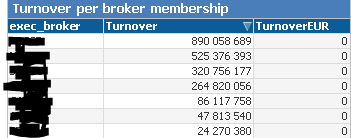
You see the picture above. Turnover is calculated by using this expression:
sum(If(IsNull(sub_exec_broker),trade_price*traded_amount)) <- Works fine!
Then I want to jsut convert it to EUR in second column by just adding:
sum(If(IsNull(sub_exec_broker),trade_price*traded_amount/rate_eur))
And it is not working. Any suggestions?
- Mark as New
- Bookmark
- Subscribe
- Mute
- Subscribe to RSS Feed
- Permalink
- Report Inappropriate Content
The only reason for this issue is that the rate_euro is null where the sub_exec_broker is empty.
Your data should be like this :
| exec_broker | sub_exec_broker | traded_amount | trade_price | rate_eur |
| A | A1 | 24000 | 10 | 1,2 |
| L | 5000 | 10 | ||
| M | M1 | 19000 | 10 | 1,2 |
| M | M2 | 18000 | 10 | 1,2 |
| P | P1 | 17000 | 10 | 1,2 |
| P | 5000 | 10 | ||
| S | 6000 | 10 |
- Mark as New
- Bookmark
- Subscribe
- Mute
- Subscribe to RSS Feed
- Permalink
- Report Inappropriate Content
sum(If(IsNull(sub_exec_broker),trade_price*traded_amount/If(IsNull(rate_eur),1,rate_eur)))
- « Previous Replies
-
- 1
- 2
- Next Replies »