Unlock a world of possibilities! Login now and discover the exclusive benefits awaiting you.

- Qlik Community
- :
- All Forums
- :
- QlikView
- :
- How to use Show all Values only within filter rang...
Options
- Subscribe to RSS Feed
- Mark Topic as New
- Mark Topic as Read
- Float this Topic for Current User
- Bookmark
- Subscribe
- Mute
- Printer Friendly Page
Turn on suggestions
Auto-suggest helps you quickly narrow down your search results by suggesting possible matches as you type.
Showing results for

Not applicable
2014-04-30
04:18 AM
- Mark as New
- Bookmark
- Subscribe
- Mute
- Subscribe to RSS Feed
- Permalink
- Report Inappropriate Content
How to use Show all Values only within filter range
I have this chart that I want to trend a expression by MonthYear.
I have selected Show All Values so that there will be a zero if there is no data in that month. (i.e. Nov 2013, Aug 2013,...)
In the below chart, I have selected the filter MonthYear>Mar 2013
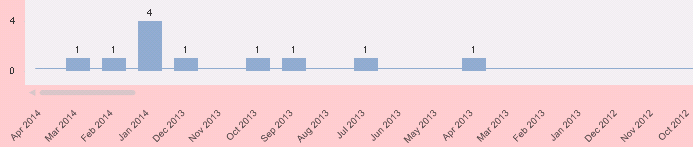
But I do not want to see months that are out of my MonthYear selection. (i.e. Mar 2013-Oct 2012)
What can I do to remove those dates that are out of my MonthYear filter but keeping those dates within?
665 Views
0 Replies