Unlock a world of possibilities! Login now and discover the exclusive benefits awaiting you.

- Qlik Community
- :
- All Forums
- :
- QlikView
- :
- How to write the expression
- Subscribe to RSS Feed
- Mark Topic as New
- Mark Topic as Read
- Float this Topic for Current User
- Bookmark
- Subscribe
- Mute
- Printer Friendly Page

 suvechha_b
- Mark as New
- Bookmark
- Subscribe
- Mute
- Subscribe to RSS Feed
- Permalink
- Report Inappropriate Content
How to write the expression
I got a chart like below :
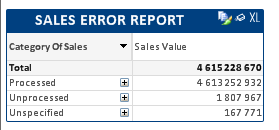
By default , I don't want to show Precessed . so thus , I used the expression fo 'Sales Value'
sum({$<TranType = {$(vAmountType)},[Fiscal_Year]=,[Month]=,category_of_sales={'*'}-{'Processed'}>} Amount) 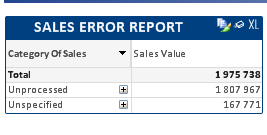
Then getting the above chart, which is my requirement.
But , when I am trying to select 'Unprocessed' and 'Unspecified' then it is not selecting.
How can I select 'Unprocessed' and 'Unspecified' ?
- Tags:
- new_to_qlikview
Accepted Solutions

 Peter_Cammaert
- Mark as New
- Bookmark
- Subscribe
- Mute
- Subscribe to RSS Feed
- Permalink
- Report Inappropriate Content
With this?
sum({$<TranType = {$(vAmountType)},[Fiscal_Year]=,[Month]=,category_of_sales -= {'Processed'}>} Amount)
Peter_Cammaert
- Mark as New
- Bookmark
- Subscribe
- Mute
- Subscribe to RSS Feed
- Permalink
- Report Inappropriate Content
With this?
sum({$<TranType = {$(vAmountType)},[Fiscal_Year]=,[Month]=,category_of_sales -= {'Processed'}>} Amount)

 Kushal_Chawda
- Mark as New
- Bookmark
- Subscribe
- Mute
- Subscribe to RSS Feed
- Permalink
- Report Inappropriate Content
would you be able to share the sample?

- Mark as New
- Bookmark
- Subscribe
- Mute
- Subscribe to RSS Feed
- Permalink
- Report Inappropriate Content
Just Click on 'Unprocessed'...see whether selection is happening.
Also make it fully compressed either by clicking on + sign or
Properties - > Presentation - > Always Fully Compressed(Left Bottom)