Unlock a world of possibilities! Login now and discover the exclusive benefits awaiting you.

- Qlik Community
- :
- All Forums
- :
- QlikView
- :
- ID's depending on condition
- Subscribe to RSS Feed
- Mark Topic as New
- Mark Topic as Read
- Float this Topic for Current User
- Bookmark
- Subscribe
- Mute
- Printer Friendly Page

- Mark as New
- Bookmark
- Subscribe
- Mute
- Subscribe to RSS Feed
- Permalink
- Report Inappropriate Content
ID's depending on condition
Hi All,
Kindly suggest solution for my below mentioned issue.
ID , Status
1 , Active
1 , In- Active
1 , Active
1 , Active
2 , In- Active
3 , Active
3 , Active
4 , Active
5 , Active
5 , In- Active
5 , Active
5 , In- Active
6 , Active
6 , In- Active
7 , Active
7 , Active
7 , In- Active
7 , In- Active
8 , In- Active
9 , Active
10 , In- Active
10 , Active
I want only those ID's who does not have In- Active Status .
My result will be :
ID
3
4
9
Hope u guys got my requirement and will help me asap.
Regards,
Minal Gedam
- « Previous Replies
-
- 1
- 2
- Next Replies »

 sunny_talwar
- Mark as New
- Bookmark
- Subscribe
- Mute
- Subscribe to RSS Feed
- Permalink
- Report Inappropriate Content
If you want to get rid of the ID's which have In- Active through the script itself, you can try this:
Table:
LOAD * Inline [
ID, Status
1, Active
1, In- Active
1, Active
1, Active
2, In- Active
3, Active
3, Active
4, Active
5, Active
5, In- Active
5, Active
5, In- Active
6, Active
6, In- Active
7, Active
7, Active
7, In- Active
7, In- Active
8, In- Active
9, Active
10, In- Active
10, Active
];
Right Join (Table)
LOAD ID
Where Flag = 1;
LOAD Distinct ID,
If(Count(If(Status = 'In- Active', Status)) > 0, 0, 1) as Flag
Resident Table
Group By ID;
Output:
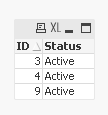
Note that you have excluded the other ID's in the script itself and will not be able to use them in your application. If you still want to use the other ids, create a flag so that you know when ID's don't have In- Active status and can be easily used in set analysis.
Table:
LOAD * Inline [
ID, Status
1, Active
1, In- Active
1, Active
1, Active
2, In- Active
3, Active
3, Active
4, Active
5, Active
5, In- Active
5, Active
5, In- Active
6, Active
6, In- Active
7, Active
7, Active
7, In- Active
7, In- Active
8, In- Active
9, Active
10, In- Active
10, Active
];
Left Join (Table)
LOAD Distinct ID,
If(Count(If(Status = 'In- Active', Status)) > 0, 0, 1) as Flag
Resident Table
Group By ID;
Output:
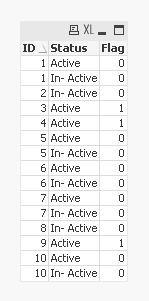
I guess there must be numerous other ways you can do this, but you have to check which is the best approach that fits your need.
HTH
Best,
Sunny
P.S.
Method1 - Community_223183.qvw
Method2 - Community_223183_v1.qvw
- « Previous Replies
-
- 1
- 2
- Next Replies »