Unlock a world of possibilities! Login now and discover the exclusive benefits awaiting you.

- Qlik Community
- :
- All Forums
- :
- QlikView
- :
- IF and statements
- Subscribe to RSS Feed
- Mark Topic as New
- Mark Topic as Read
- Float this Topic for Current User
- Bookmark
- Subscribe
- Mute
- Printer Friendly Page

- Mark as New
- Bookmark
- Subscribe
- Mute
- Subscribe to RSS Feed
- Permalink
- Report Inappropriate Content
IF and statements
Hello,
I am trying to use an if statement to filter out and get a specific set of data for a column.
Just as an example say I have a column that says NumOfProducts and it will be listed as either 'Single or 'Multiple'
And also I have a column with PRODUCTDESC which is listed with about 50 different labels, '1: Wood', '2: Toys', etc..
I am looking to get rid of any 'Single' that works only with '1: Wood'
I tried using =IF(Numofprod<>'Single' AND PRODUCTDESC<>'1: Wood', PRODUCTDESC)
So that I could just suppress the Null and get rid of the Single that works onl with 1: Wood, however, when I use this if statement it seems to just catch every PRODUCTDESC that's '1: Wood' and makes it a null value.
| CONSUMER | NUMOFPRODUCTS | PRODUCTDESC |
| Tom | Single | 1: WOOD |
| Bob | Multiple | 1: WOOD |
| Bob | Multiple | 2: TOYS |
| Bob | Multiple | 3: FOOD |
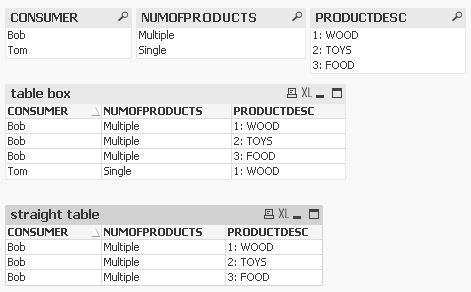
As an example this is what my straight table looks like and when I use my If statement, it ends up putting the a null value where 1: WOOD in Bob's row when it shouldn't. I am only looking to put null values in the PRODUCTDESC column for 'Single' AND '1: Wood'
What can I do to fix this? Is there something else I should do to make it easier?
Thank you!

 MarcoWedel
- Mark as New
- Bookmark
- Subscribe
- Mute
- Subscribe to RSS Feed
- Permalink
- Report Inappropriate Content
Hi,
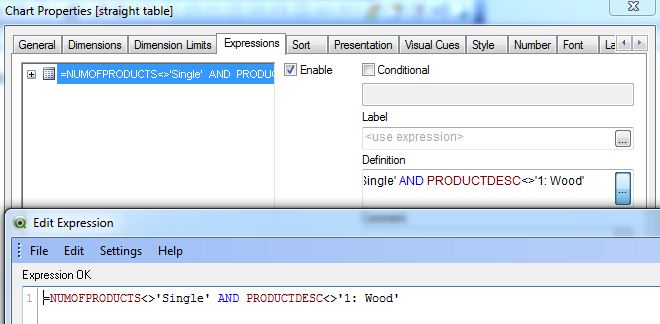
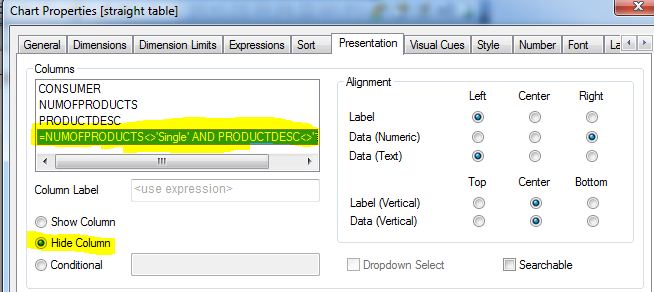
hope this helps:
regards
Marco
MarcoWedel
- Mark as New
- Bookmark
- Subscribe
- Mute
- Subscribe to RSS Feed
- Permalink
- Report Inappropriate Content