Unlock a world of possibilities! Login now and discover the exclusive benefits awaiting you.

- Qlik Community
- :
- All Forums
- :
- QlikView
- :
- Identifying removed or new items on weekly report
- Subscribe to RSS Feed
- Mark Topic as New
- Mark Topic as Read
- Float this Topic for Current User
- Bookmark
- Subscribe
- Mute
- Printer Friendly Page

- Mark as New
- Bookmark
- Subscribe
- Mute
- Subscribe to RSS Feed
- Permalink
- Report Inappropriate Content
Identifying removed or new items on weekly report
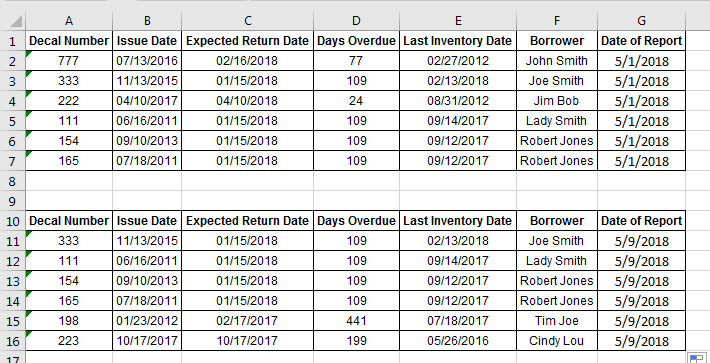
I have a weekly property report that has a list of items by decal number. Each week, items can be removed or new items can be added to the report.
I need to look at the current week and previous week report to see which items were either added or removed from the previous week.
To do this in excel, I would run a vlookup for each decal number on the current report to search for the decal number on the previous report. If it is not there, I know it's a new item. Then, I would run a vlookup for each decal on previous report to search for decal number on current report. If it is not there, I know the item was removed.
How would I go about doing this in Qlikview? I need a total number of removed and added items and also the ability to identify which items are removed or added week to week.
- Tags:
- vlookup
- weekly report