Unlock a world of possibilities! Login now and discover the exclusive benefits awaiting you.

- Qlik Community
- :
- All Forums
- :
- QlikView
- :
- InMonths function giving strange results
- Subscribe to RSS Feed
- Mark Topic as New
- Mark Topic as Read
- Float this Topic for Current User
- Bookmark
- Subscribe
- Mute
- Printer Friendly Page

 shearwatertroy
- Mark as New
- Bookmark
- Subscribe
- Mute
- Subscribe to RSS Feed
- Permalink
- Report Inappropriate Content
InMonths function giving strange results
Hey everyone,
I have a question regarding the inmonths function.
I'm trying to colour code sales from customers that are older that 6 months ago.
Here is what I'm using.
Equation:
if (inmonths (6, Max( [Order Date] ), Today(), -1), Red() )
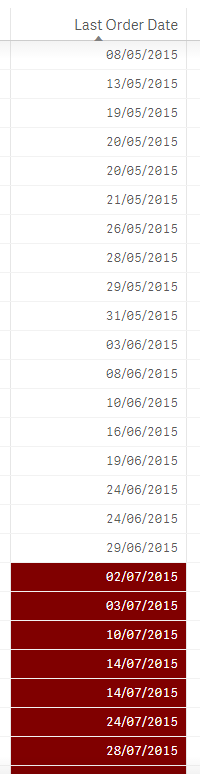
Problem: January, February, March, April, May, and June of previous years are not being colour coded. I have attached a small screen shot Due to the number of records you can't see much of the previous information.
My source for inmonths function:

 sunny_talwar
- Mark as New
- Bookmark
- Subscribe
- Mute
- Subscribe to RSS Feed
- Permalink
- Report Inappropriate Content
You want to color 6 months for this year and last year? May be this:
If(InMonths(6,Max([Order Date]), Today(), -1) or InMonths(6,Max([Order Date]), AddYears(Today(), -1), -1), Red())
shearwatertroy
- Mark as New
- Bookmark
- Subscribe
- Mute
- Subscribe to RSS Feed
- Permalink
- Report Inappropriate Content
This is close, but I want to set a user defined variable for how many months they want to go back.
Plus I want to highlight everything from 6 months back.
So if customer A hasn't purchased anything since December 2014 I want to be able to see that highlighted.
With the second part of your equation, it's limiting the scope to 1 year prior.
One solution I came up with was:
if( (Year (Max ( [Order Date] ) ) <> Year (Today () ) or ( inmonths ( varMonthLimit, Max ( [Order Date] ), Today (), -1) ) ) , Red() )
Which highlights everything NOT within this calendar year and X months back. Problem with this, is that in January, everything in December is highlighted red because it's not in the calendar year.
