Unlock a world of possibilities! Login now and discover the exclusive benefits awaiting you.

- Qlik Community
- :
- All Forums
- :
- QlikView
- :
- Incorrect expression using set analysis
- Subscribe to RSS Feed
- Mark Topic as New
- Mark Topic as Read
- Float this Topic for Current User
- Bookmark
- Subscribe
- Mute
- Printer Friendly Page

 maoros
- Mark as New
- Bookmark
- Subscribe
- Mute
- Subscribe to RSS Feed
- Permalink
- Report Inappropriate Content
Incorrect expression using set analysis
Hi everyone,
I have a problem with a set analysis expression and I didn't identify which is the error.
Suppose we have the following data.
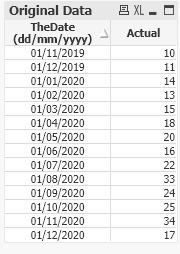
For the date 01/11/2019, I want to get the expect value equals to 0.
For 01/12/2019, Expected value = 0
For 01/01/2020, Expected value = 10
For 01/02/2020, Expected value = 11
For 01/03/2020, Expected value = 14
and so on.
That is,
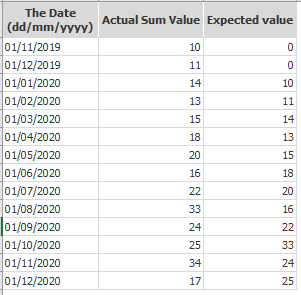
However, I get 0's when I am using the following set analysis expression:
=Sum({< TheDate={">=$(=MonthStart(AddMonths(TheDate,-2)))<=$(=MonthEnd(AddMonths(TheDate,-2)))"} >} Actual)
But it is not correct because I get 0's and I didn't find which is my error.
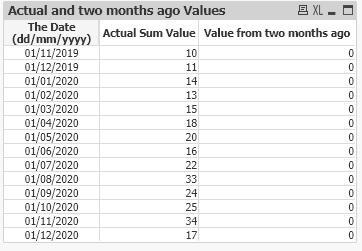
Any ideas?
I include the qvw file used (ValueForSpecificDate.qvw).
I really appreciate your help.
--- maoh
Accepted Solutions

 Kushal_Chawda
- Mark as New
- Bookmark
- Subscribe
- Mute
- Subscribe to RSS Feed
- Permalink
- Report Inappropriate Content
Probably you need this
=sum(aggr(above(sum({<TheDate>}Actual),2),TheDate))*avg(1)
Kushal_Chawda
- Mark as New
- Bookmark
- Subscribe
- Mute
- Subscribe to RSS Feed
- Permalink
- Report Inappropriate Content
Probably you need this
=sum(aggr(above(sum({<TheDate>}Actual),2),TheDate))*avg(1)
maoros
- Mark as New
- Bookmark
- Subscribe
- Mute
- Subscribe to RSS Feed
- Permalink
- Report Inappropriate Content
Thank you. It works!
