Unlock a world of possibilities! Login now and discover the exclusive benefits awaiting you.

- Qlik Community
- :
- All Forums
- :
- QlikView
- :
- Inline tables functionality
- Subscribe to RSS Feed
- Mark Topic as New
- Mark Topic as Read
- Float this Topic for Current User
- Bookmark
- Subscribe
- Mute
- Printer Friendly Page

 sakshikaul
- Mark as New
- Bookmark
- Subscribe
- Mute
- Subscribe to RSS Feed
- Permalink
- Report Inappropriate Content
Inline tables functionality
Hi
I have to maintain an internal table in qlik view in which I have to compare last year date for Diwali with current Year date for Diwali. Following is the data to be maintained in inline table
LastDate currentDate event
12/10/2017 22/10/2018 diwali
22/11/2017 12/10/2018 durga pooja
so, I have maintained following above table in inline table and also
I have derived lastDate and CurrentDate from (circled in black color)
Date#(CreateDate, 'YYYYMMDD') as Sold_Date,
date(Date#(CreateDate, 'YYYYMMDD')) as lastDate,
date(Date#( CreateDate, 'YYYYMMDD')) as CurrentDate,
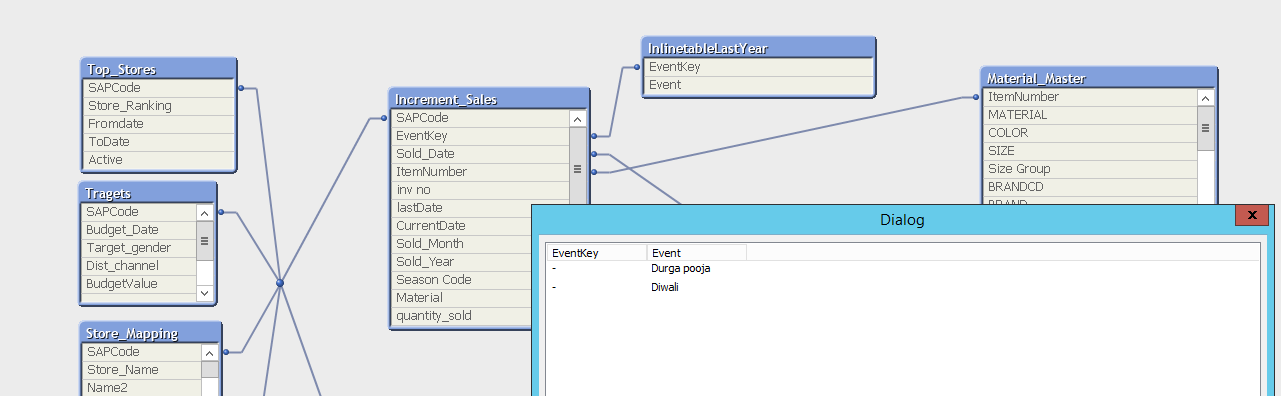
Following is the data model for the above
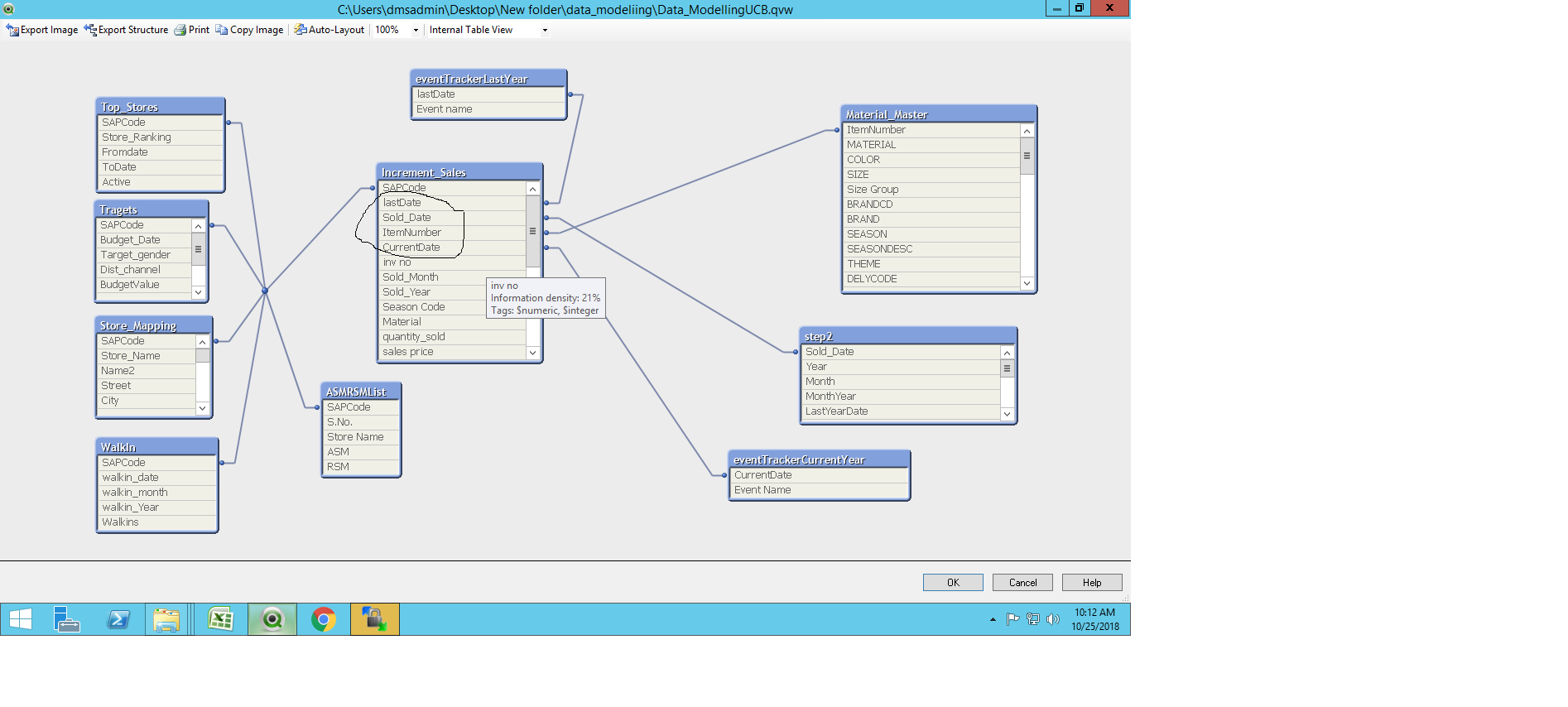
Below is the image in which date for inline table is not correct ie I am getting 10/21/4670 instead of 10/21/2017
so how to make it correct?
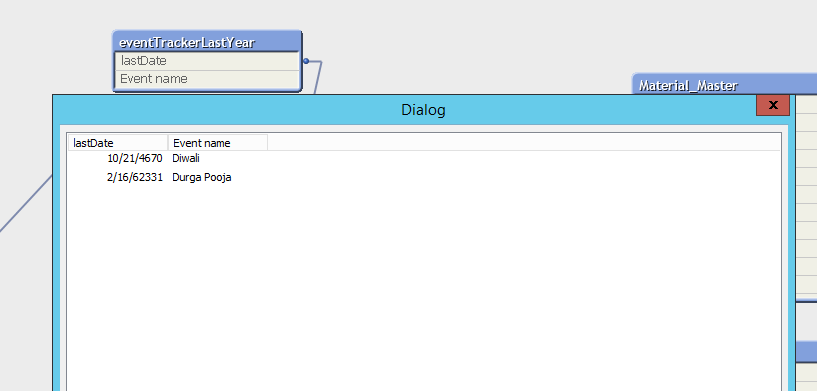
can we apply date function in inline table in qlikview?
- « Previous Replies
-
- 1
- 2
- Next Replies »

 sunny_talwar
- Mark as New
- Bookmark
- Subscribe
- Mute
- Subscribe to RSS Feed
- Permalink
- Report Inappropriate Content
Check here
sakshikaul
- Mark as New
- Bookmark
- Subscribe
- Mute
- Subscribe to RSS Feed
- Permalink
- Report Inappropriate Content
Hi
I want to make a composite key so for that I am writing following code for inline table
Inlinetable:
LOAD
Date(Date#( lastDate,'DD/MM/YYYY'),'YYYMMDD') &
Date(Date#(CurrentDate, 'DD/MM/YYYY'), 'YYYMMDD') as EventKey,
Event
INLINE [
lastDate,CurrentDate, Event
10/12/2017, 12/10/2018, Durga pooja
11/10/2017, 10/10/2018, Diwali
];
but its giving me error
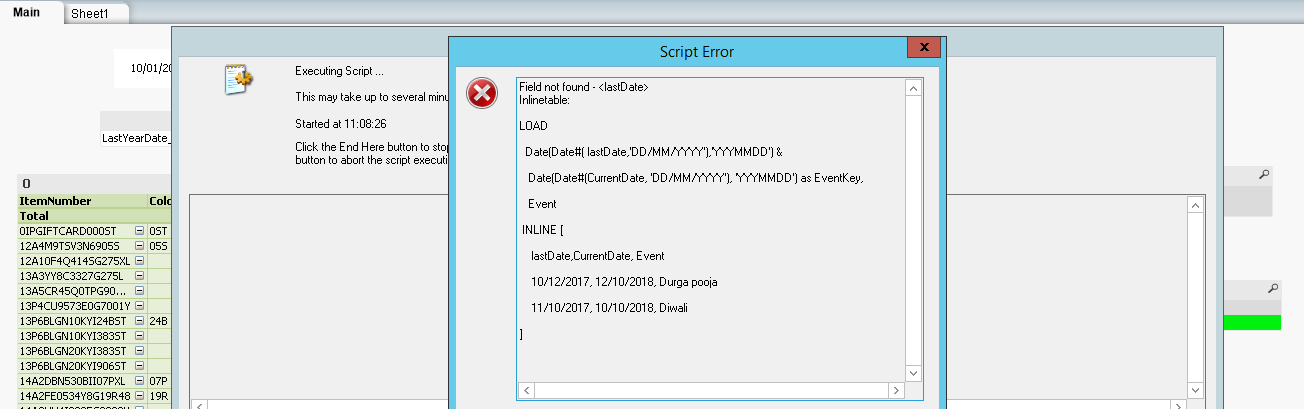
lastDate field do exist in my script
LOAD SAPCode,
[inv no],
Sold_Date,
lastDate,
CurrentDate,
Date(lastDate, 'YYYMMDD') & Date(CurrentDate, 'YYYMMDD') as EventKey,
Sold_Month,
Sold_Year,
ItemNumber,
[Season Code],
COLOR,
Material,
quantity_sold,
[sales price],
[inv value],
[Inv val Bucket],
[tax amount]
FROM
[..\QVD\transform_qvd\IncrementSales_full.qvd]
(qvd);
Please help in solving the issue

- Mark as New
- Bookmark
- Subscribe
- Mute
- Subscribe to RSS Feed
- Permalink
- Report Inappropriate Content
Script is not mandatory, check field name in QVD whether it has or not. Can you load QVD alone and test
sunny_talwar
- Mark as New
- Bookmark
- Subscribe
- Mute
- Subscribe to RSS Feed
- Permalink
- Report Inappropriate Content
I think you might have missed a semi-colon here
Inlinetable:
LOAD
Date(Date#( lastDate,'DD/MM/YYYY'),'YYYMMDD') &
Date(Date#(CurrentDate, 'DD/MM/YYYY'), 'YYYMMDD') as EventKey,
Event;
INLINE [
lastDate,CurrentDate, Event
10/12/2017, 12/10/2018, Durga pooja
11/10/2017, 10/10/2018, Diwali
];
sakshikaul
- Mark as New
- Bookmark
- Subscribe
- Mute
- Subscribe to RSS Feed
- Permalink
- Report Inappropriate Content
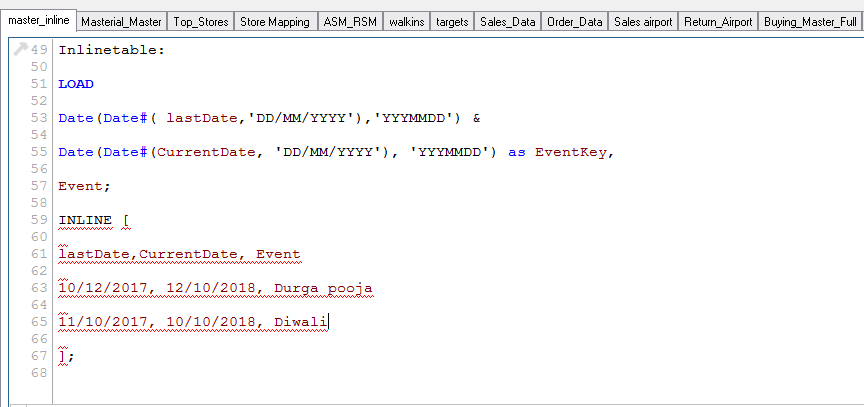
this semicolon after event is giving an error
sunny_talwar
- Mark as New
- Bookmark
- Subscribe
- Mute
- Subscribe to RSS Feed
- Permalink
- Report Inappropriate Content
Oops my bad, would you be able to share the log file to show the issue?
sunny_talwar
- Mark as New
- Bookmark
- Subscribe
- Mute
- Subscribe to RSS Feed
- Permalink
- Report Inappropriate Content
I tried this and it ran without any trouble
LOAD Date(Date#(lastDate,'DD/MM/YYYY'),'YYYMMDD') & Date(Date#(CurrentDate, 'DD/MM/YYYY'), 'YYYMMDD') as EventKey,
Event
INLINE [
lastDate, CurrentDate, Event
10/12/2017, 12/10/2018, Durga pooja
11/10/2017, 10/10/2018, Diwali
];
 maheshkuttappa
- Mark as New
- Bookmark
- Subscribe
- Mute
- Subscribe to RSS Feed
- Permalink
- Report Inappropriate Content
Include "Load * " before Inline
LOAD Date(Date#(lastDate,'DD/MM/YYYY'),'YYYMMDD') & Date(Date#(CurrentDate, 'DD/MM/YYYY'), 'YYYMMDD') as EventKey,
Event;
LOAD * INLINE [
lastDate, CurrentDate, Event
10/12/2017, 12/10/2018, Durga pooja
11/10/2017, 10/10/2018, Diwali
];
sakshikaul
- Mark as New
- Bookmark
- Subscribe
- Mute
- Subscribe to RSS Feed
- Permalink
- Report Inappropriate Content
after reloading the data I am not getting any values for eventKey in inline table

- « Previous Replies
-
- 1
- 2
- Next Replies »