Unlock a world of possibilities! Login now and discover the exclusive benefits awaiting you.

- Qlik Community
- :
- All Forums
- :
- QlikView
- :
- Invalid Month error in QVC
- Subscribe to RSS Feed
- Mark Topic as New
- Mark Topic as Read
- Float this Topic for Current User
- Bookmark
- Subscribe
- Mute
- Printer Friendly Page

 kkkumar82
- Mark as New
- Bookmark
- Subscribe
- Mute
- Subscribe to RSS Feed
- Permalink
- Report Inappropriate Content
Invalid Month error in QVC
Hi all,
I am getting an Invalid month error while trying incremental load using qvc component.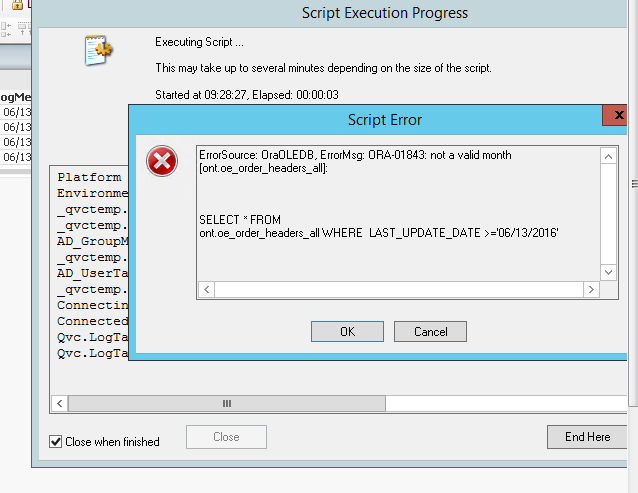
Any help , I am using MM/DD/YYYY format
rwunderlich
- Tags:
- error usuario

 miguelbraga
- Mark as New
- Bookmark
- Subscribe
- Mute
- Subscribe to RSS Feed
- Permalink
- Report Inappropriate Content
Hello there,
This is the first time that appears this error? If so, does the LAST_UPDATE_DATE have the date in your format? If not, then be careful because you might encounter some problems...
Hope it helps 
Regards,
MB

 Clever_Anjos
- Mark as New
- Bookmark
- Subscribe
- Mute
- Subscribe to RSS Feed
- Permalink
- Report Inappropriate Content
Maybe your Oracle clients is configured into another DATE format
Please use just after your connecti
SQL
alter session set nls_date_format="MM/DD/YYYY"

 swuehl
- Mark as New
- Bookmark
- Subscribe
- Mute
- Subscribe to RSS Feed
- Permalink
- Report Inappropriate Content
could you try to execute this and post the resulting table line?
SELECT * FROM nls_session_parameters WHERE parameter = 'NLS_DATE_FORMAT';

 rwunderlich
- Mark as New
- Bookmark
- Subscribe
- Mute
- Subscribe to RSS Feed
- Permalink
- Report Inappropriate Content
If you set the correct database:
SET Qvc.Loader.v.Database=ORACLE;
and then use the QVC generated variable:
SELECT * FROM table
WHERE $(Qvc.Loader.v.IncrementalExpression);
QVC should take care of the correct formatting for datetime.
-Rob

- Mark as New
- Bookmark
- Subscribe
- Mute
- Subscribe to RSS Feed
- Permalink
- Report Inappropriate Content
Hi kkkumar82,
How are you calculating this date?. Use addmonths, don't add +1 in months.
Regards!