Unlock a world of possibilities! Login now and discover the exclusive benefits awaiting you.

- Qlik Community
- :
- All Forums
- :
- QlikView
- :
- Issue on pie chart
- Subscribe to RSS Feed
- Mark Topic as New
- Mark Topic as Read
- Float this Topic for Current User
- Bookmark
- Subscribe
- Mute
- Printer Friendly Page

- Mark as New
- Bookmark
- Subscribe
- Mute
- Subscribe to RSS Feed
- Permalink
- Report Inappropriate Content
Issue on pie chart
Hi
i have requirement on pie chart
1)in my pie chart i have 5 regions for eg:North ,east ,West,South,central
2)each zone having different Values for eg:North=20%,south=30%,west=30%,east=10%,central=25%
now my requirement is
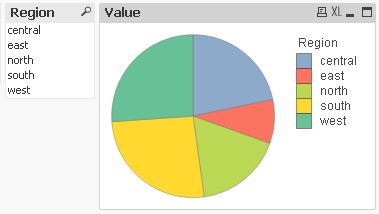
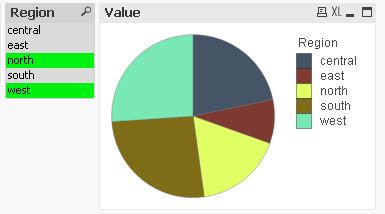
When ever i select any zone (east,west,north,south,central) my pie chart should show all the zones instead of selected zone and also it has to highlight the selected zone.
how to archive this ......
Thanks
- « Previous Replies
-
- 1
- 2
- Next Replies »

 MarcoWedel
- Mark as New
- Bookmark
- Subscribe
- Mute
- Subscribe to RSS Feed
- Permalink
- Report Inappropriate Content
Hi,
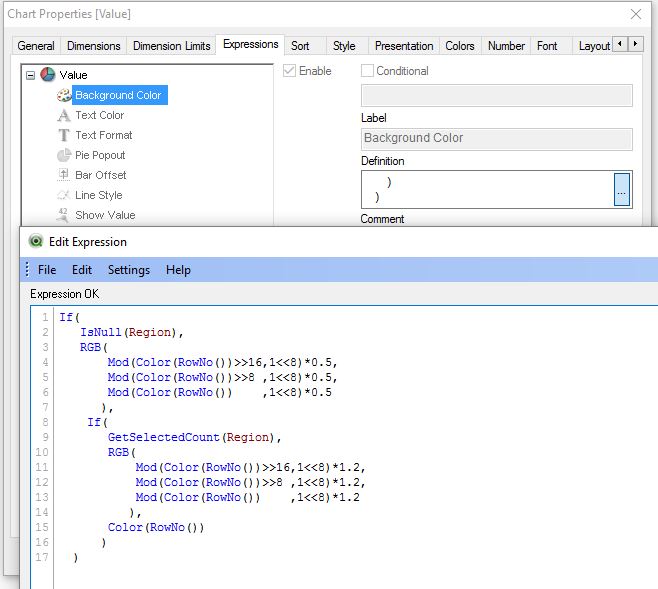
then try like this:

- Mark as New
- Bookmark
- Subscribe
- Mute
- Subscribe to RSS Feed
- Permalink
- Report Inappropriate Content
Hi Abubakar,
go to the chart properties-->Colors-->Data Aperance like shown in below screen shot:
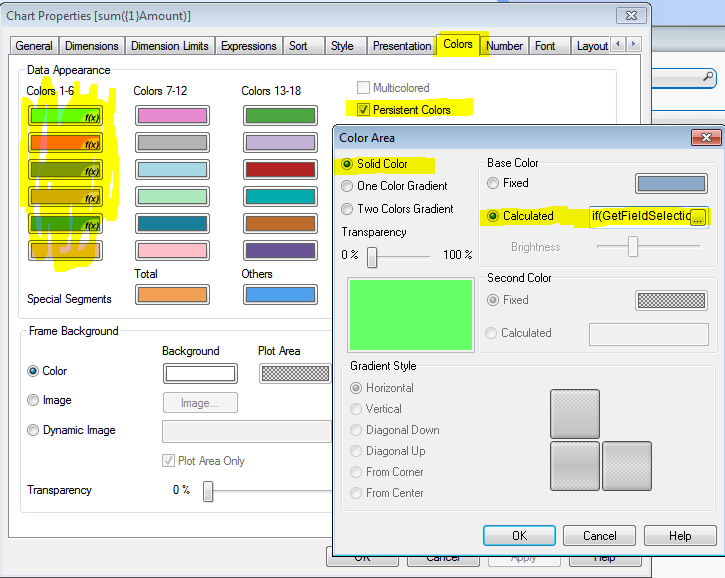
use below expressions :
if(GetFieldSelections(Region)='4',rgb(102,255,102),rgb(98,138,183))
if(GetFieldSelections(Region)=5,rgb(102,255,102),rgb(252,115,98))
if(GetFieldSelections(Region)=6,rgb(102,255,102),rgb(125,152,35))
if(GetFieldSelections(Region)=7,rgb(102,255,102),rgb(210,173,0))
if(GetFieldSelections(Region)=8,rgb(102,255,102),rgb(65,160,115))
hope this will help you...
- Mark as New
- Bookmark
- Subscribe
- Mute
- Subscribe to RSS Feed
- Permalink
- Report Inappropriate Content
Great job
Thanks
- « Previous Replies
-
- 1
- 2
- Next Replies »