Unlock a world of possibilities! Login now and discover the exclusive benefits awaiting you.

- Qlik Community
- :
- All Forums
- :
- QlikView
- :
- Issue
- Subscribe to RSS Feed
- Mark Topic as New
- Mark Topic as Read
- Float this Topic for Current User
- Bookmark
- Subscribe
- Mute
- Printer Friendly Page

 subbareddykm
- Mark as New
- Bookmark
- Subscribe
- Mute
- Subscribe to RSS Feed
- Permalink
- Report Inappropriate Content
Issue
Hai all good eve to all,
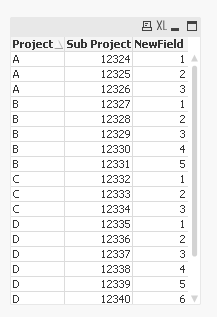
i have one requirement,Can any any one tell me how to do this in backend .
Please find below attchment for reference.I want new field like screenshot

- « Previous Replies
-
- 1
- 2
- Next Replies »
Accepted Solutions

 sunny_talwar
- Mark as New
- Bookmark
- Subscribe
- Mute
- Subscribe to RSS Feed
- Permalink
- Report Inappropriate Content
Try this:
DATA:
LOAD Project,
[Sub Project]
FROM
[ACCUMILATION.xlsx]
(ooxml, embedded labels, table is Sheet1);
FinalTable:
LOAD *,
If(Project = Peek('Project'), RangeSum(Peek('NewField'), 1), 1) as NewField
Resident DATA
Order By Project;
DROP Table DATA;

- Mark as New
- Bookmark
- Subscribe
- Mute
- Subscribe to RSS Feed
- Permalink
- Report Inappropriate Content
do like this?
Load * inline
[Project, Subproject, NewField
A,1234, qwe
A, 2345, fgh
and so on....
];
sunny_talwar
- Mark as New
- Bookmark
- Subscribe
- Mute
- Subscribe to RSS Feed
- Permalink
- Report Inappropriate Content
May be try this:
Table:
LOAD Project,
Sub Project
FROM Source;
FinalTable:
LOAD *,
If(Project = Peek('Project'), RangeSum(Peek('NewField'), 1), 1) as NewField
Resident Table
Order By Project;
DROP Table Table;
UPDATE: Missed a single quote after Project field within Peek
 avinashelite
- Mark as New
- Bookmark
- Subscribe
- Mute
- Subscribe to RSS Feed
- Permalink
- Report Inappropriate Content
what's you requirement ?? you want to create a table in the script ??
could you please explain your requirement
sunny_talwar
- Mark as New
- Bookmark
- Subscribe
- Mute
- Subscribe to RSS Feed
- Permalink
- Report Inappropriate Content
I am assuming that it is to create the NewField in the image  , But I may very well be wrong here
avinashelite
- Mark as New
- Bookmark
- Subscribe
- Mute
- Subscribe to RSS Feed
- Permalink
- Report Inappropriate Content
No , Bro ..I think that might be the requirement ... lets wait for the reply
subbareddykm
- Mark as New
- Bookmark
- Subscribe
- Mute
- Subscribe to RSS Feed
- Permalink
- Report Inappropriate Content
Sunny,
what i want is my output field is New Field.How to acheive that ?
avinashelite
- Mark as New
- Bookmark
- Subscribe
- Mute
- Subscribe to RSS Feed
- Permalink
- Report Inappropriate Content
did you check the previous post by Sunny ??
sunny_talwar
- Mark as New
- Bookmark
- Subscribe
- Mute
- Subscribe to RSS Feed
- Permalink
- Report Inappropriate Content
Try this:
DATA:
LOAD Project,
[Sub Project]
FROM
[ACCUMILATION.xlsx]
(ooxml, embedded labels, table is Sheet1);
FinalTable:
LOAD *,
If(Project = Peek('Project'), RangeSum(Peek('NewField'), 1), 1) as NewField
Resident DATA
Order By Project;
DROP Table DATA;
 vikasmahajan
- Mark as New
- Bookmark
- Subscribe
- Mute
- Subscribe to RSS Feed
- Permalink
- Report Inappropriate Content
HTH
Vikas
If the issue is solved please mark the answer with Accept as Solution & like it.
If you want to go quickly, go alone. If you want to go far, go together.
- « Previous Replies
-
- 1
- 2
- Next Replies »