Unlock a world of possibilities! Login now and discover the exclusive benefits awaiting you.

- Qlik Community
- :
- All Forums
- :
- QlikView
- :
- Issues With Master Calendar
- Subscribe to RSS Feed
- Mark Topic as New
- Mark Topic as Read
- Float this Topic for Current User
- Bookmark
- Subscribe
- Mute
- Printer Friendly Page

- Mark as New
- Bookmark
- Subscribe
- Mute
- Subscribe to RSS Feed
- Permalink
- Report Inappropriate Content
Issues With Master Calendar
I am new to scripting and am struggling with the master calendar. I have a large dataset (which for ease here I have out into excel).
I am trying to use the exampel code for a master claendar to be created from the [Job Card Raised Date] field. It just seems to add new rows to the data with no association to the date so the filters do not work in a relational way!
I am sure I am doing something odd, and would really appreciate some help 🙂
My load statement looks like this: -
LOAD
[Job Reference],
[Incident Reference],
[Incident Date Reported],
[Parent Job Reference],
Division,
[Technical Admin Area],
[3 Divisions],
[Incident Status],
[Job Status],
[Last Job Status],
[Job Card Raised Date],
[Schedule Date],
[Job Card Due Date],
[Job Card Completion Date],
[Recorded Date],
[Meter Option Due Date],
[Reason For Missing Due Date],
[Order Book Category],
[Work Description],
Address,
Comments,
[Gang Members],
[Full Activity Path],
[Job Activity],
[Activity ID],
[Raised By],
[Order Book Category1],
Depot,
Function,
[Start Date],
[Days Since Raise],
[WDs Since Raise],
Months,
Group,
[Exclusion from B.H List],
[Function 2],
[KPI Type]
FROM
(
[All Open Jobs$]);
- Tags:
- new_to_qlikview
- Mark as New
- Bookmark
- Subscribe
- Mute
- Subscribe to RSS Feed
- Permalink
- Report Inappropriate Content
If you generate a master calendar in its own table, you'll need to connect it back to your current table. For example, you seem to have a field called [Start Date], rename your calendar date to [Start Date] and they will connect together.
- Mark as New
- Bookmark
- Subscribe
- Mute
- Subscribe to RSS Feed
- Permalink
- Report Inappropriate Content
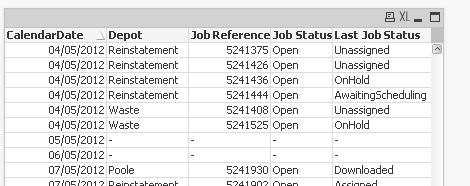
Thank you. I have linked the tables (feeling a bit silly) and have the data in the correct place and relational, but have blanks where he master calendar has created rows for dates I dont have
- Mark as New
- Bookmark
- Subscribe
- Mute
- Subscribe to RSS Feed
- Permalink
- Report Inappropriate Content
Thank you. I have linked the tables (feeling a bit silly) and have the data in the correct place and relational, but have blanks where he master calendar has created rows for dates I dont have.
the script I borrowed was same load as above then
Calendar:
LET vDateMin = Num(MakeDate(2006,1,1));
LET vDateMax = Floor(MonthEnd(Today()));
LET vDateToday = Num(Today());
TempCalendar:
LOAD
$(vDateMin) + RowNo() - 1 AS DateNumber,
Date($(vDateMin) + RowNo() - 1) AS TempDate
AUTOGENERATE 1
WHILE $(vDateMin)+IterNo()-1<= $(vDateMax);
Calendar:
LOAD
Date(TempDate,'dd/mm/yyyy') AS CalendarDate,
// Standard Date Objects
Day(TempDate) AS CalendarDayOfMonth,
WeekDay(TempDate) AS CalendarDayName,
Week(TempDate) AS CalendarWeekOfYear,
Month(TempDate) AS CalendarMonthName,
'Q' & Ceil(Month(TempDate)/3) AS CalendarQuarter,
Year(TempDate) AS CalendarYear,
// Calendar Date Names
WeekName(TempDate) as CalendarWeekNumberAndYear,
MonthName(TempDate) as CalendarMonthAndYear,
QuarterName(TempDate) as CalendarQuarterMonthsAndYear,
// Start Dates
DayStart(TempDate) as CalendarDayStart,
WeekStart(TempDate) as CalendarWeekStart,
MonthStart(TempDate) as CalendarMonthStart,
QuarterStart(TempDate) as CalendarQuarterStart,
YearStart(TempDate) as CalendarYearStart,
// End Dates
DayEnd(TempDate) as CalendarDayEnd,
WeekEnd(TempDate) as CalendarWeekEnd,
MonthEnd(TempDate) as CalendarMonthEnd,
QuarterEnd(TempDate) as CalendarQuarterEnd,
YearEnd(TempDate) as CalendarYearEnd,
// Combo Date Examples
'Q' & Ceil(Month(TempDate)/3) & '/' & Year(TempDate) AS CalendarQuarterAndYear,
Year(TempDate) & '/' & 'Q' & Ceil(Month(TempDate)/3) AS CalendarYearAndQuarter,
'Wed ' & DayStart(WeekStart(TempDate) + 3) as CalendarWednesdays
RESIDENT TempCalendar ORDER BY TempDate ASC;
DROP TABLE TempCalendar;
LET vDateMin = Num(MakeDate(2000,1,1));
LET vDateMax = Floor(YearEnd(AddMonths(Today(), 12)));
LET vDateToday = Num(Today());