Unlock a world of possibilities! Login now and discover the exclusive benefits awaiting you.

- Qlik Community
- :
- All Forums
- :
- QlikView
- :
- Issues with Cyclic Drill down
- Subscribe to RSS Feed
- Mark Topic as New
- Mark Topic as Read
- Float this Topic for Current User
- Bookmark
- Subscribe
- Mute
- Printer Friendly Page

- Mark as New
- Bookmark
- Subscribe
- Mute
- Subscribe to RSS Feed
- Permalink
- Report Inappropriate Content
Issues with Cyclic Drill down
Hi ,
I have issues with cyclic drilldown. Attached reference application and data file
1- Can we remove the cyclic button from header and put it in separate dropdown ?
2- In cyclic , can we drill down directly to next dimension instead of clicking the header to drill down?
Please help . urgent

 trdandamudi
- Mark as New
- Bookmark
- Subscribe
- Mute
- Subscribe to RSS Feed
- Permalink
- Report Inappropriate Content
1- Can we remove the cyclic button from header and put it in separate drop down ?
You can but you will not get the same view as you shown in the table.
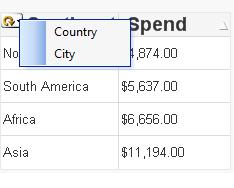
2- In cyclic , can we drill down directly to next dimension instead of clicking the header to drill down?
Place your cursor on the drop down in the cycle button and you will see a drop down list and you can select as needed. (See pic below)

 vishsaggi
- Mark as New
- Bookmark
- Subscribe
- Mute
- Subscribe to RSS Feed
- Permalink
- Report Inappropriate Content
Can you explain a little what exactly you mean cyclic button in a separate dropdown ? You can use pivot table by removing your Cyclic dimension and click on + signs to drill down to County and City.

 othniel2014
- Mark as New
- Bookmark
- Subscribe
- Mute
- Subscribe to RSS Feed
- Permalink
- Report Inappropriate Content
Are you using a simple table just to order it?
if you need to deploy by level, use a pivot table, if you use a simple table just to order it,
I have a method of sorting a pivot table
in the chart,
--->tab "genaral" change a Pivot Table
--->tab "dimension" ---> remove "Location" and add --->Continent, Country, City
--->tab "sort" ----> expression ---> =sum(Spend) just for expressions to sort.