Unlock a world of possibilities! Login now and discover the exclusive benefits awaiting you.

- Qlik Community
- :
- All Forums
- :
- QlikView
- :
- Join Max Date
- Subscribe to RSS Feed
- Mark Topic as New
- Mark Topic as Read
- Float this Topic for Current User
- Bookmark
- Subscribe
- Mute
- Printer Friendly Page

- Mark as New
- Bookmark
- Subscribe
- Mute
- Subscribe to RSS Feed
- Permalink
- Report Inappropriate Content
Join Max Date
Hi!!
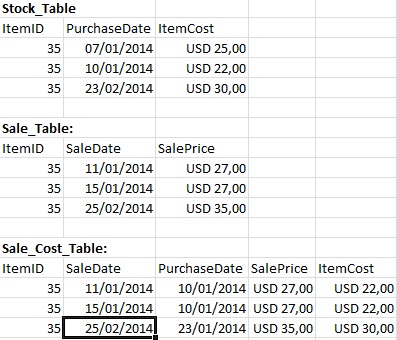
I've to join two table by the itemID and Sale/Purchase Date.
In this join I have to connect the ItemID from table Sale with the corresponding ItemID in the table Stock where the last PurshaseDate is <= SaleDate.
can someone help me?
- Tags:
- qlikview_scripting
- « Previous Replies
-
- 1
- 2
- Next Replies »
- Mark as New
- Bookmark
- Subscribe
- Mute
- Subscribe to RSS Feed
- Permalink
- Report Inappropriate Content
Hi Muhammad!!
As you do, the results are shown separately.
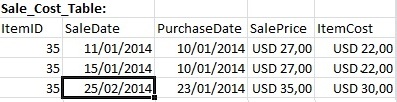
My intention is to make a 'max' on PurchaseDate, bringing the record immediately previous or equal to SaleDate.
The result should be right as the image.

 fernando_tonial
- Mark as New
- Bookmark
- Subscribe
- Mute
- Subscribe to RSS Feed
- Permalink
- Report Inappropriate Content
Olá Fernando!
Consegui utilizando o IntervalMatch.
Segue Script e anexo.
Purchase_TMP:
LOAD
    ItemID,
    ItemCost,
    PurchaseDate
FROM
tables.xlsx
(ooxml, embedded labels, table is Stock_Table)
Where not IsNull (ItemID);

Purchase:
LOAD
    ItemID,
    ItemCost,
    PurchaseDate    As PurchaseDateStart,
    If(ItemID<>Peek(ItemID),Date(Today()),Date(Peek(PurchaseDateStart)-1)) as PurchaseDateEnd
Resident Purchase_TMP
Order by ItemID asc, PurchaseDate desc;

DROP Table Purchase_TMP;


MinMaxDate:
Load Min(PurchaseDateStart) as MinDate, Max(PurchaseDateEnd) as MaxDate resident Purchase;

Let vMinDate = Peek('MinDate',-1,'MinMaxDate') - 1;
Let vMaxDate = Peek('MaxDate',-1,'MinMaxDate')    ;


Date:
Load Date(recno()+$(vMinDate)) as SaleDate Autogenerate vMaxDate - vMinDate;

DROP Table MinMaxDate;
Join (Purchase)
IntervalMatch (SaleDate) LOAD PurchaseDateStart, PurchaseDateEnd  Resident Purchase;


Inner Join (Purchase)
LOAD ItemID,
     SaleDate,
     SalePrice
FROM
tables.xlsx
(ooxml, embedded labels, table is Sale_Table);

DROP Table Date;

// Only for check values
QUALIFY *;
Stock:
LOAD
    ItemID,
    ItemCost,
    PurchaseDate
FROM
tables.xlsx
(ooxml, embedded labels, table is Stock_Table);

Sale:
LOAD ItemID,
     SaleDate,
     SalePrice
FROM
tables.xlsx
(ooxml, embedded labels, table is Sale_Table);
- « Previous Replies
-
- 1
- 2
- Next Replies »