Unlock a world of possibilities! Login now and discover the exclusive benefits awaiting you.

- Qlik Community
- :
- All Forums
- :
- QlikView
- :
- Join and concatenate difference
- Subscribe to RSS Feed
- Mark Topic as New
- Mark Topic as Read
- Float this Topic for Current User
- Bookmark
- Subscribe
- Mute
- Printer Friendly Page

 konidena
- Mark as New
- Bookmark
- Subscribe
- Mute
- Subscribe to RSS Feed
- Permalink
- Report Inappropriate Content
Join and concatenate difference
Hi Team,
I am feeling enough to know the difference between the join and concatenate difference
But here I have a little confusion on how to display the concatenated table or joined table in the qlikview sheet
Here is my code snippet
LOAD * INLINE [
customer, sales
andy, 123
becky, 234
];
concatenate
LOAD * INLINE [
customer, country
becky, canada
carla, mexico
];
Question: How to display the iinline columns as a table in the qlikview sheet.
In this case, customer, sales and country are the columns
- Tags:
- new_to_qlikview
Accepted Solutions

 avinashelite
- Mark as New
- Bookmark
- Subscribe
- Mute
- Subscribe to RSS Feed
- Permalink
- Report Inappropriate Content
Hi Srinivasa,
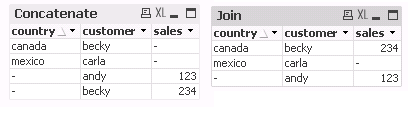
If you use Concatenation then Qlikview will just append the values it will not check for the common key .
In the other hand if you use JOIN it will check for the common key and will not repeat the value , see the below image you will get the difference

 gautik92
- Mark as New
- Bookmark
- Subscribe
- Mute
- Subscribe to RSS Feed
- Permalink
- Report Inappropriate Content
default join that is outer join needed
 tripatirao
- Mark as New
- Bookmark
- Subscribe
- Mute
- Subscribe to RSS Feed
- Permalink
- Report Inappropriate Content
Hi
In internal table viewer you can see the difference.
In case of concatnate the second table will append to the first table based on the common field.
you will get duplicate values also
But In join you will not get duplicate value.
Load these table and check in table viewer you can find the difference
Thanks
 SreeniJD
- Mark as New
- Bookmark
- Subscribe
- Mute
- Subscribe to RSS Feed
- Permalink
- Report Inappropriate Content
Hi Srinivas Rao,
Its pretty simple, if you understand the basic logic..
JOIN... Joins the tables (while joining it will search for some common column) so if you go back to mathematics sets and analysis.. its simply an UNION statement..
based on the requirement, you can override with the option of LEFT, RIGHT (which table to join)
and there is something like, KEEP which performs in a similar way but it will keep all the tables which are involved in the process.
CONCATENATE.. it will concatenate the tables.. which means just append the data(more rows, duplicates as well) for non common columns, blanks will be there...
Happy to Help!
Sreeni

 nagarjuna_kotha
- Mark as New
- Bookmark
- Subscribe
- Mute
- Subscribe to RSS Feed
- Permalink
- Report Inappropriate Content
Follow below link it might help you:
avinashelite
- Mark as New
- Bookmark
- Subscribe
- Mute
- Subscribe to RSS Feed
- Permalink
- Report Inappropriate Content
Hi Srinivasa,
If you use Concatenation then Qlikview will just append the values it will not check for the common key .
In the other hand if you use JOIN it will check for the common key and will not repeat the value , see the below image you will get the difference
