Unlock a world of possibilities! Login now and discover the exclusive benefits awaiting you.

- Qlik Community
- :
- All Forums
- :
- QlikView
- :
- Labels on Gauge Chart
Options
- Subscribe to RSS Feed
- Mark Topic as New
- Mark Topic as Read
- Float this Topic for Current User
- Bookmark
- Subscribe
- Mute
- Printer Friendly Page
Turn on suggestions
Auto-suggest helps you quickly narrow down your search results by suggesting possible matches as you type.
Showing results for

Not applicable
2014-04-04
04:56 PM
- Mark as New
- Bookmark
- Subscribe
- Mute
- Subscribe to RSS Feed
- Permalink
- Report Inappropriate Content
Labels on Gauge Chart
Hi,
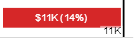
Is it possible to have labels on gauge chart as in below pic:
Thanks!
SAK
1,945 Views
1 Solution
Accepted Solutions

 maxgro
MVP
2014-04-04
05:31 PM
- Mark as New
- Bookmark
- Subscribe
- Mute
- Subscribe to RSS Feed
- Permalink
- Report Inappropriate Content
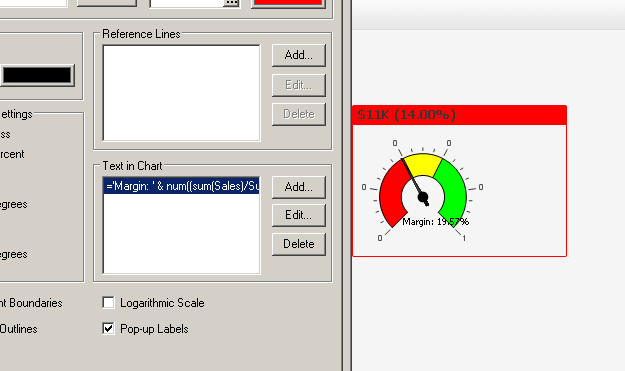
in Presentation tab you can add a Text in chart and then (see image, "Margin 19,57%")
Shift + Ctrl to drag it
or you can add a Title (General Tab, Show title in chart)
1,598 Views
3 Replies
maxgro
MVP
2014-04-04
05:14 PM
- Mark as New
- Bookmark
- Subscribe
- Mute
- Subscribe to RSS Feed
- Permalink
- Report Inappropriate Content
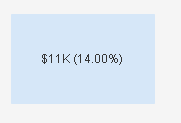
do you mean how to format number? or what else?
=
num(11000/1000, '$#,##0;($#,##0)') & 'K'
& ' (' & num(0.14 ,'###.##%') & ')'
Not applicable
2014-04-04
05:21 PM
Author
- Mark as New
- Bookmark
- Subscribe
- Mute
- Subscribe to RSS Feed
- Permalink
- Report Inappropriate Content
I mean how to get the label inside the gauge.
Thanks for formatting too! 
1,598 Views
maxgro
MVP
2014-04-04
05:31 PM
- Mark as New
- Bookmark
- Subscribe
- Mute
- Subscribe to RSS Feed
- Permalink
- Report Inappropriate Content
in Presentation tab you can add a Text in chart and then (see image, "Margin 19,57%")
Shift + Ctrl to drag it
or you can add a Title (General Tab, Show title in chart)
1,599 Views