Unlock a world of possibilities! Login now and discover the exclusive benefits awaiting you.

- Qlik Community
- :
- All Forums
- :
- QlikView
- :
- Larger text object contains less text...
- Subscribe to RSS Feed
- Mark Topic as New
- Mark Topic as Read
- Float this Topic for Current User
- Bookmark
- Subscribe
- Mute
- Printer Friendly Page

- Mark as New
- Bookmark
- Subscribe
- Mute
- Subscribe to RSS Feed
- Permalink
- Report Inappropriate Content
Larger text object contains less text...
Hi, i am new qlikview an ran into this behaviour:
I made a text object containing an expression.
I copy-pasted it and gave it different widths.
The larger one contains less text!
Pic:

Am I doing something wrong or is this a bug?
Thanks
-Nick
Accepted Solutions

 m_woolf
- Mark as New
- Bookmark
- Subscribe
- Mute
- Subscribe to RSS Feed
- Permalink
- Report Inappropriate Content
I would have written it like this:
='Line 1' & chr(10) & ''Line 2' & chr(10) & 'Line 3'

 shambhub
- Mark as New
- Bookmark
- Subscribe
- Mute
- Subscribe to RSS Feed
- Permalink
- Report Inappropriate Content
Hey nir,
just go and change Font in "Text Object", dats it
- Mark as New
- Bookmark
- Subscribe
- Mute
- Subscribe to RSS Feed
- Permalink
- Report Inappropriate Content
The font type doesn't change anything but I get other weird behaviours:
- Making the font smaller sometimes shows less text
- Making the font larger shows more text
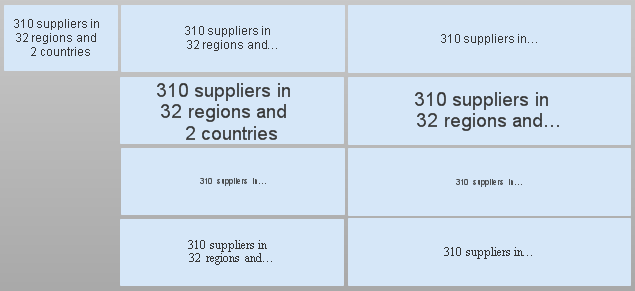
What the?
- Mark as New
- Bookmark
- Subscribe
- Mute
- Subscribe to RSS Feed
- Permalink
- Report Inappropriate Content
Hi Nick,
seems to be a strange behaviour (or even a bug) when using the newline-char (\n). As a workaround replace the "\n" with a real newline similar to this:
='This is the first line \n' & 'and this second'
-->
='This is the first line
' & 'and this second'
It looks a bit funny but it should help.
Roland
- Mark as New
- Bookmark
- Subscribe
- Mute
- Subscribe to RSS Feed
- Permalink
- Report Inappropriate Content
Indeed, it looks like a bug but your workaround works perfectly.
Thanks
m_woolf
- Mark as New
- Bookmark
- Subscribe
- Mute
- Subscribe to RSS Feed
- Permalink
- Report Inappropriate Content
I would have written it like this:
='Line 1' & chr(10) & ''Line 2' & chr(10) & 'Line 3'