Unlock a world of possibilities! Login now and discover the exclusive benefits awaiting you.

- Qlik Community
- :
- All Forums
- :
- QlikView
- :
- Launch Action - mstsc
- Subscribe to RSS Feed
- Mark Topic as New
- Mark Topic as Read
- Float this Topic for Current User
- Bookmark
- Subscribe
- Mute
- Printer Friendly Page

- Mark as New
- Bookmark
- Subscribe
- Mute
- Subscribe to RSS Feed
- Permalink
- Report Inappropriate Content
Launch Action - mstsc
Hi,
I have created a new Launch action with the application mstsc which opens a new Remote Desktop session as soon as I click on the Text Object. In the Parameters section, if I enter /v:servername when I click the Text Object it opens up a Remote Desktop Session with the server name. However what I want it to do is take it from the field name network_path: ie: If I select my criteria and in the Text Object is the server transformfs, I want it to connect to transformfs.
I have tried /:v=network_path, but I get an error. Does anyone have any suggestions at all?
Regards,
Jon Ditchfield
- Tags:
- add
- application
- lauch_application
- launch
- load
- mstsc
- parameters
- qlikview
- qlikview_scripting
- qvd
- remote_desktop
- script
- sql
- text
- text_object
Accepted Solutions
- Mark as New
- Bookmark
- Subscribe
- Mute
- Subscribe to RSS Feed
- Permalink
- Report Inappropriate Content
First create the Variable
Let vNP = network_path. This field must contain only one value other wise you may get null value.
Then use the Variable in the action
/v:$(vNP)
- Mark as New
- Bookmark
- Subscribe
- Mute
- Subscribe to RSS Feed
- Permalink
- Report Inappropriate Content
First create the Variable
Let vNP = network_path. This field must contain only one value other wise you may get null value.
Then use the Variable in the action
/v:$(vNP)
- Mark as New
- Bookmark
- Subscribe
- Mute
- Subscribe to RSS Feed
- Permalink
- Report Inappropriate Content
Got it working by entering the following in the Parameters on Launch = '/v:' &vNP
 rustyfishbones
- Mark as New
- Bookmark
- Subscribe
- Mute
- Subscribe to RSS Feed
- Permalink
- Report Inappropriate Content
Hi Johnathon,
I used Launch and added the mstsc.exe
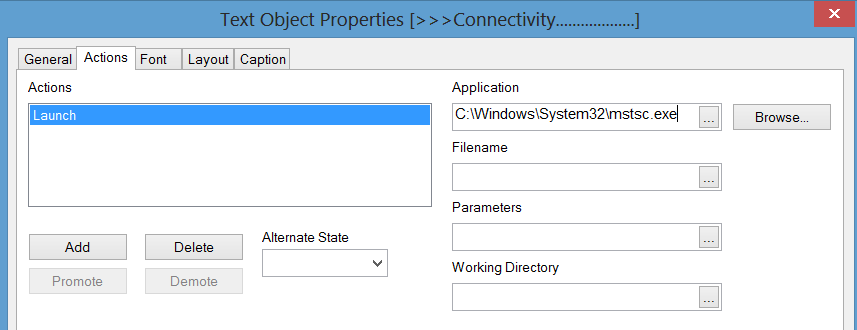
I was wondering, this opens up the RDC, but I want to log onto another site by clicking a button in Qlikview, any tips on how to do it. Could I create a.bat file and just launch that from within Qlikview?
Regards
Alan
- Mark as New
- Bookmark
- Subscribe
- Mute
- Subscribe to RSS Feed
- Permalink
- Report Inappropriate Content
Hi Alan,
Firstly in my load script which takes data from SQL, there is a table called Server with a field called Network_Path (which is my UNC Path). I then created a variable in Qlikview and called it vNP with the value of =Network_Path. I then created a standard text object with the text of =Network_Path (to show the network path), and created a Launch Action with the following parameters:
Application: =('C:\WINDOWS\system32\mstsc.exe') //This is the directory of Remote Desktop
Parameters: =vNP //This entered the parameters as the =Network_Path, so it will contect to Remote Desktop with whatever value is in the =Networth_Path
Regards,
Jon
rustyfishbones
- Mark as New
- Bookmark
- Subscribe
- Mute
- Subscribe to RSS Feed
- Permalink
- Report Inappropriate Content
Thanks Jonathon,
I have it working by just launching RDP's already created
Thanks
Regards
Alan