Unlock a world of possibilities! Login now and discover the exclusive benefits awaiting you.

- Qlik Community
- :
- All Forums
- :
- QlikView
- :
- Linking tables without association
- Subscribe to RSS Feed
- Mark Topic as New
- Mark Topic as Read
- Float this Topic for Current User
- Bookmark
- Subscribe
- Mute
- Printer Friendly Page

- Mark as New
- Bookmark
- Subscribe
- Mute
- Subscribe to RSS Feed
- Permalink
- Report Inappropriate Content
Linking tables without association
Hi all,
I am trying to link two table together while on purpose not having them join/associate.
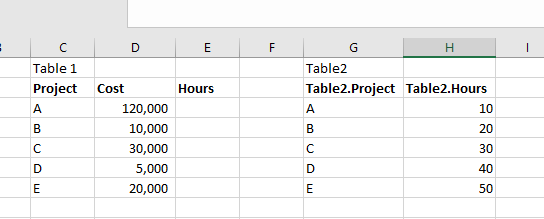
Let me explain based on example below. I have two table (Table 1 and Table 2). Both have a project column with the same values in them. So obviously, I could have both tables join/associate in Qlikview and link them up. I have a specific reason that I don't want to do that so in order to avoid this to happen, I qualified Table 2 in the loading script.
Now that that is done, I do would like the hours from Table 2 to appear in Table 1. I was thinking I can maybe do this by capturing the project letter of Table 1 and use that in a set analysis to sum the hours but not sure how to do that. I tried this expression in Table 1 but it is not working:
=sum({<Table2.Project = {'Project'}>} Table2.Hours)
Any ideas? Many thanks in advance.
- « Previous Replies
-
- 1
- 2
- Next Replies »
- Mark as New
- Bookmark
- Subscribe
- Mute
- Subscribe to RSS Feed
- Permalink
- Report Inappropriate Content
Thanks Stefan and Emmanuel. It seems the best way to go is to join the table during the loading script. I'll give that a shot
Thanks again for the help
- « Previous Replies
-
- 1
- 2
- Next Replies »