Unlock a world of possibilities! Login now and discover the exclusive benefits awaiting you.

- Qlik Community
- :
- All Forums
- :
- QlikView
- :
- List Box - Displaying both frequency and percentag...
- Subscribe to RSS Feed
- Mark Topic as New
- Mark Topic as Read
- Float this Topic for Current User
- Bookmark
- Subscribe
- Mute
- Printer Friendly Page

- Mark as New
- Bookmark
- Subscribe
- Mute
- Subscribe to RSS Feed
- Permalink
- Report Inappropriate Content
List Box - Displaying both frequency and percentage
Hi,
I need to display both the count (frequency) and the percentage for the field in a list box object. I know that in properties you select 'show frequency' to show the count and 'In Percent' to show the count in a percentage format. I need to display both for the field for example:
Type:
A 20 (20%)
B 50 (50%)
C 30 (30%)
Any suggestions would be greatly appreciated.
Thanks...
- Tags:
- new_to_qlikview

 sunny_talwar
- Mark as New
- Bookmark
- Subscribe
- Mute
- Subscribe to RSS Feed
- Permalink
- Report Inappropriate Content
You can use the expression tab within the list box properties tab:
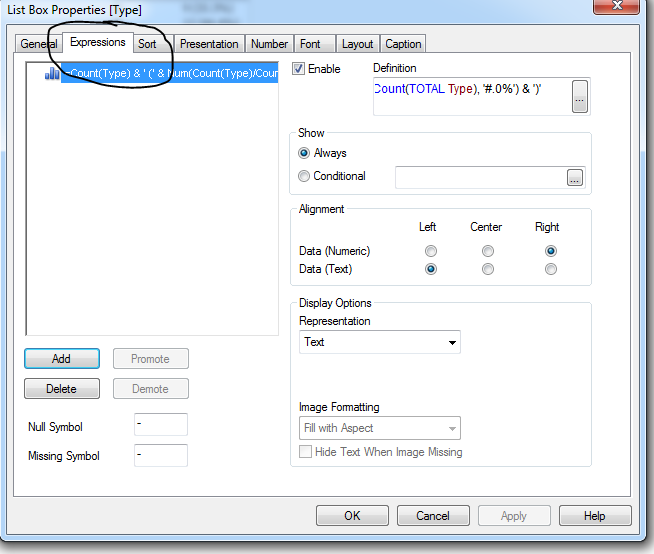
and write a expression like this:
=Count(Type) & ' (' & Num(Count(Type)/Count(TOTAL Type), '#.0%') & ')'
HTH
Best,
Sunny
sunny_talwar
- Mark as New
- Bookmark
- Subscribe
- Mute
- Subscribe to RSS Feed
- Permalink
- Report Inappropriate Content
Or use this expression if you don't want the count and % to change based on a selection of type:
=Count({<Type = >}Type) & ' (' & Num(Count({<Type = >}Type)/Count({<Type = >}TOTAL Type), '#.0%') & ')'
HTH
Best,
Sunny

 buzzy996
- Mark as New
- Bookmark
- Subscribe
- Mute
- Subscribe to RSS Feed
- Permalink
- Report Inappropriate Content
see tis,

- Mark as New
- Bookmark
- Subscribe
- Mute
- Subscribe to RSS Feed
- Permalink
- Report Inappropriate Content
Thank you Sunindia..That worked...
sunny_talwar
- Mark as New
- Bookmark
- Subscribe
- Mute
- Subscribe to RSS Feed
- Permalink
- Report Inappropriate Content
Awesome 
I am glad it worked

 b_garside
- Mark as New
- Bookmark
- Subscribe
- Mute
- Subscribe to RSS Feed
- Permalink
- Report Inappropriate Content
Mark it as Answered....