Unlock a world of possibilities! Login now and discover the exclusive benefits awaiting you.

Announcements
Share your agentic AI experience, learn from others, and earn a new badge: Put Agentic AI to Work
- Qlik Community
- :
- All Forums
- :
- QlikView
- :
- List Box Values with expression
Options
- Subscribe to RSS Feed
- Mark Topic as New
- Mark Topic as Read
- Float this Topic for Current User
- Bookmark
- Subscribe
- Mute
- Printer Friendly Page
Turn on suggestions
Auto-suggest helps you quickly narrow down your search results by suggesting possible matches as you type.
Showing results for

Not applicable
2016-03-14
08:15 AM
- Mark as New
- Bookmark
- Subscribe
- Mute
- Subscribe to RSS Feed
- Permalink
- Report Inappropriate Content
List Box Values with expression
Dear QVExperts,
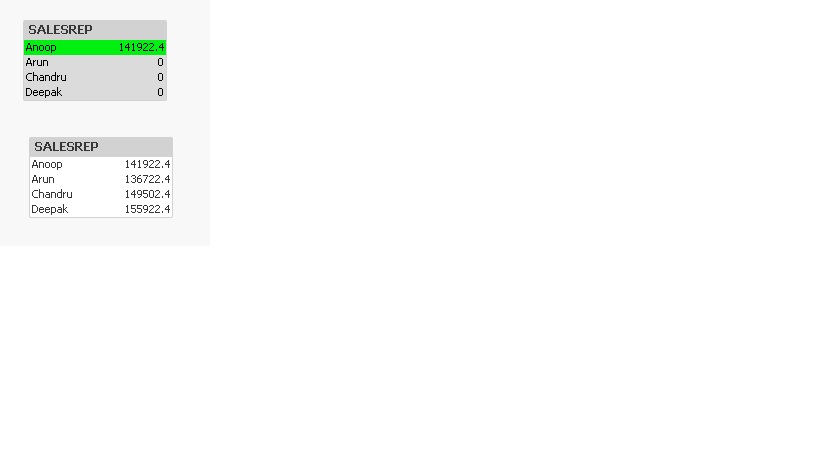
A listbox in the dashboard, displays only the expression only to the selected value.
Is it the default behaviour? Can i able to display the expression for all the values of the listbox?
Please find enclosed the Sample file.
Thanks,
Sasi
2,559 Views
1 Solution
Accepted Solutions

 sunny_talwar
MVP
2016-03-14
08:16 AM
- Mark as New
- Bookmark
- Subscribe
- Mute
- Subscribe to RSS Feed
- Permalink
- Report Inappropriate Content
4 Replies
sunny_talwar
MVP
2016-03-14
08:16 AM
- Mark as New
- Bookmark
- Subscribe
- Mute
- Subscribe to RSS Feed
- Permalink
- Report Inappropriate Content
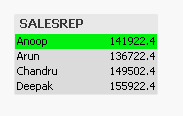
Try this expression:
=Sum({1}Sales)
Not applicable
2016-03-14
08:19 AM
Author
- Mark as New
- Bookmark
- Subscribe
- Mute
- Subscribe to RSS Feed
- Permalink
- Report Inappropriate Content
Thanks a lot Sunny. It worked.
1,673 Views
sunny_talwar
MVP
2016-03-14
08:24 AM
- Mark as New
- Bookmark
- Subscribe
- Mute
- Subscribe to RSS Feed
- Permalink
- Report Inappropriate Content
Just so you know, Sum({1} Sales) won't change based on any selection, but if you would like it to change based on certain selections such as Region or Product, you can also try using Sum({<SALESREP>} Sales) to just ignore selections in SALESREP field. 
Not applicable
2016-03-14
08:28 AM
Author
- Mark as New
- Bookmark
- Subscribe
- Mute
- Subscribe to RSS Feed
- Permalink
- Report Inappropriate Content
Yeah. Sure. Tried & working.
1,673 Views