Unlock a world of possibilities! Login now and discover the exclusive benefits awaiting you.

- Qlik Community
- :
- All Forums
- :
- QlikView
- :
- List Box's Gray values disappear
- Subscribe to RSS Feed
- Mark Topic as New
- Mark Topic as Read
- Float this Topic for Current User
- Bookmark
- Subscribe
- Mute
- Printer Friendly Page

- Mark as New
- Bookmark
- Subscribe
- Mute
- Subscribe to RSS Feed
- Permalink
- Report Inappropriate Content
List Box's Gray values disappear
Hi,
I am using an expression to create a List Box object. The expression is :
If( aggr( sum(SalesAmount), CalendarYear) > 0, CalendarYear).
It shows 5 values - 2010, 2011, 2012, 2013, 2014
The problem is whenever I select any value from this object, only selected value remains in the list Box while the rest of the values disappear from the List Box object.
How can I show all the excluded values too in Listbox?
Please find the attached screenshot.
Thanks

Accepted Solutions

 sunny_talwar
- Mark as New
- Bookmark
- Subscribe
- Mute
- Subscribe to RSS Feed
- Permalink
- Report Inappropriate Content
This should work
=Aggr(If(Sum({<CalendarYear>}SalesAmount) > 0, Only({<CalendarYear>}CalendarYear)), CalendarYear)
Update: Sample attached
sunny_talwar
- Mark as New
- Bookmark
- Subscribe
- Mute
- Subscribe to RSS Feed
- Permalink
- Report Inappropriate Content
May be try this:
Aggr(If(Sum({<CalendarYear>}SalesAmount) > 0, CalendarYear), CalendarYear)
- Mark as New
- Bookmark
- Subscribe
- Mute
- Subscribe to RSS Feed
- Permalink
- Report Inappropriate Content
Sorry its not working

sunny_talwar
- Mark as New
- Bookmark
- Subscribe
- Mute
- Subscribe to RSS Feed
- Permalink
- Report Inappropriate Content
This should work
=Aggr(If(Sum({<CalendarYear>}SalesAmount) > 0, Only({<CalendarYear>}CalendarYear)), CalendarYear)
Update: Sample attached
- Mark as New
- Bookmark
- Subscribe
- Mute
- Subscribe to RSS Feed
- Permalink
- Report Inappropriate Content
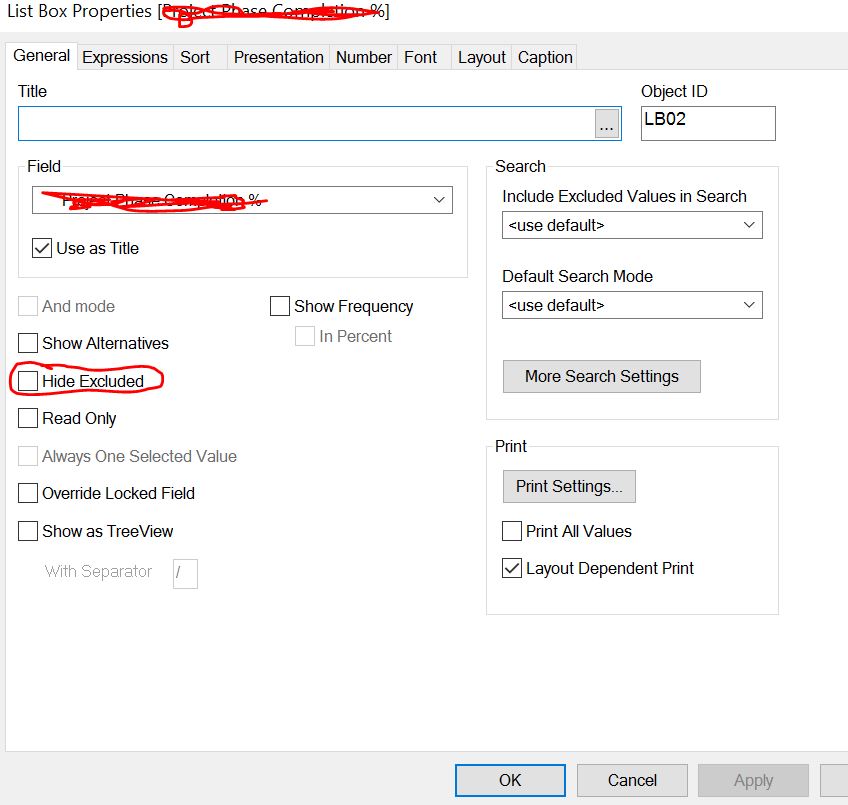
Is the Hide Excluded from Properties - General Unchecked?
- Mark as New
- Bookmark
- Subscribe
- Mute
- Subscribe to RSS Feed
- Permalink
- Report Inappropriate Content
Awesome!
- Mark as New
- Bookmark
- Subscribe
- Mute
- Subscribe to RSS Feed
- Permalink
- Report Inappropriate Content
Hi Abhishek,
Please check if you have unchecked the Hide excluded in listbox properties.