Unlock a world of possibilities! Login now and discover the exclusive benefits awaiting you.

- Qlik Community
- :
- All Forums
- :
- QlikView
- :
- List box expression
- Subscribe to RSS Feed
- Mark Topic as New
- Mark Topic as Read
- Float this Topic for Current User
- Bookmark
- Subscribe
- Mute
- Printer Friendly Page

 upaliwije
- Mark as New
- Bookmark
- Subscribe
- Mute
- Subscribe to RSS Feed
- Permalink
- Report Inappropriate Content
List box expression
Hi Firiends
I have created a expression to limit Ailments to 10 in my list box and other ailments to be shown as OTHERS. How ever it does show only 9 ailments and OTHRES do not apper at all. Pls chcek my below expression and corret my expression.
=aggr(If(Rank(SUM({<CLA_CODE={'SS'},PRL_PTY_CODE={'INP'},ALM_CODE-={"C152","NMT"}>}LBP_CLAIMS_PAID))<=10,ALM_DESC,'OTHERS'),ALM_DESC)
Thanks
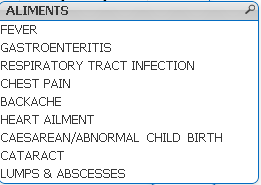
upaliwije
- Mark as New
- Bookmark
- Subscribe
- Mute
- Subscribe to RSS Feed
- Permalink
- Report Inappropriate Content
Can someone please help me ? If you need further information pls contact me please

 tresB
tresB
- Mark as New
- Bookmark
- Subscribe
- Mute
- Subscribe to RSS Feed
- Permalink
- Report Inappropriate Content
Could you share your sample app?
upaliwije
- Mark as New
- Bookmark
- Subscribe
- Mute
- Subscribe to RSS Feed
- Permalink
- Report Inappropriate Content
I attach h/w my sample data
 bc-thebruuu
- Mark as New
- Bookmark
- Subscribe
- Mute
- Subscribe to RSS Feed
- Permalink
- Report Inappropriate Content
In the application you provided, the field PRL_PTY_CODE doesn't exists
So ... is smthing like that what you are looking for?
=If(Aggr(Rank(TOTAL SUM({<CLA_CODE={'SS'},ALM_CODE-={"C152","NMT"}>}LBP_CLAIMS_PAID)),ALM_DESC)<=10,ALM_DESC,'OTHERS')
 lanlizgu
- Mark as New
- Bookmark
- Subscribe
- Mute
- Subscribe to RSS Feed
- Permalink
- Report Inappropriate Content
What selections are you doing?
I did a binary to your document using the formula and I see correctly the list box.
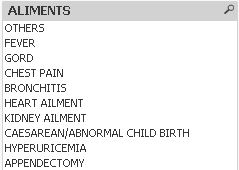
lanlizgu
- Mark as New
- Bookmark
- Subscribe
- Mute
- Subscribe to RSS Feed
- Permalink
- Report Inappropriate Content
As Bruno mentioned PRL_PTY_CODE doesn't exists but PRL_CODE
