Unlock a world of possibilities! Login now and discover the exclusive benefits awaiting you.

- Qlik Community
- :
- All Forums
- :
- QlikView
- :
- List box for Bookmark
- Subscribe to RSS Feed
- Mark Topic as New
- Mark Topic as Read
- Float this Topic for Current User
- Bookmark
- Subscribe
- Mute
- Printer Friendly Page

- Mark as New
- Bookmark
- Subscribe
- Mute
- Subscribe to RSS Feed
- Permalink
- Report Inappropriate Content
List box for Bookmark
Hi All
i read the blog post YA(H)Q Blog
I set my bookmark as below :-
BM01 for SOURC=TDSS
BM02 for SOURC=TDST
BM03 for SOURC=TDSKL
BM04 for SOURC=TDSPG
BM05 for SOURC=TID
My inline load as below :-
LOAD * INLINE[
BMName ,BMId
BM 01 TDSS ,BM01
BM 02 TDST ,BM02
BM 03 TKL ,BM04
BM 04 TPG ,BM05
BM 05 TID ,BM06
];
But when i click the list box 1 , Box 2 field label does not turn on. when i use Bookmark pull down manu it work fine.
Can some one advise me where go wrong ?
Paul
Accepted Solutions

 simondachstr
- Mark as New
- Bookmark
- Subscribe
- Mute
- Subscribe to RSS Feed
- Permalink
- Report Inappropriate Content
2 small mistakes:
1) The first trigger is a Clear All, which takes off the selection in the bookmark. Remove this.
2) In your INLINE table you load BM01, BM02 etc. which is fine. However, the bookmarks you created carry a different ID:
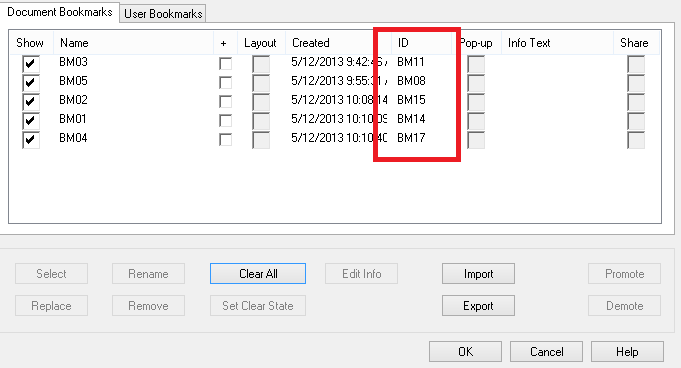
Fix those two issues and it should work all fine.
Martin
simondachstr
- Mark as New
- Bookmark
- Subscribe
- Mute
- Subscribe to RSS Feed
- Permalink
- Report Inappropriate Content
2 small mistakes:
1) The first trigger is a Clear All, which takes off the selection in the bookmark. Remove this.
2) In your INLINE table you load BM01, BM02 etc. which is fine. However, the bookmarks you created carry a different ID:
Fix those two issues and it should work all fine.
Martin
- Mark as New
- Bookmark
- Subscribe
- Mute
- Subscribe to RSS Feed
- Permalink
- Report Inappropriate Content
Thank you for your image , i know where i am wrong.