Unlock a world of possibilities! Login now and discover the exclusive benefits awaiting you.

- Qlik Community
- :
- All Forums
- :
- QlikView
- :
- List box selection not reflected in chart
- Subscribe to RSS Feed
- Mark Topic as New
- Mark Topic as Read
- Float this Topic for Current User
- Bookmark
- Subscribe
- Mute
- Printer Friendly Page

- Mark as New
- Bookmark
- Subscribe
- Mute
- Subscribe to RSS Feed
- Permalink
- Report Inappropriate Content
List box selection not reflected in chart
This is probably a stuppid question, but I have a chart with two dimensions (weekstart and Market)
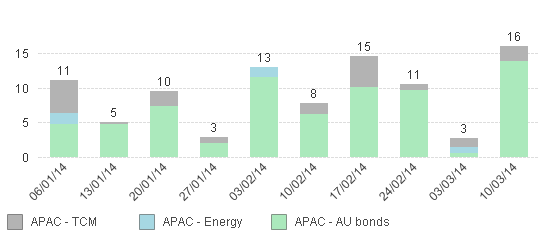
My expression is very simple (i have substituted the real name of my summed field with XXXXX)
=SUM({$<Market={'APAC*'}>}XXXXX/1000)
When I select one of the 3 markets, the chart does not change. However, when I select any other value in any other list box the chart changes accordingly.
Why is this 'Market' field different?!
- Tags:
- new_to_qlikview
Accepted Solutions

 CELAMBARASAN
- Mark as New
- Bookmark
- Subscribe
- Mute
- Subscribe to RSS Feed
- Permalink
- Report Inappropriate Content
If you want to do so you could use this
=SUM({$*<Market={'APAC*'}>} XXXXX/1000)
there is a asterisk in between $ and <.

 kji
kji
- Mark as New
- Bookmark
- Subscribe
- Mute
- Subscribe to RSS Feed
- Permalink
- Report Inappropriate Content
$<Market={'APAC*'}> in your expression means you are ignoring selections in market and treating it as if APAC is selected. Look up "Set analysis" for more information.
CELAMBARASAN
- Mark as New
- Bookmark
- Subscribe
- Mute
- Subscribe to RSS Feed
- Permalink
- Report Inappropriate Content
If you want to do so you could use this
=SUM({$*<Market={'APAC*'}>} XXXXX/1000)
there is a asterisk in between $ and <.

 ThornOfCrowns
- Mark as New
- Bookmark
- Subscribe
- Mute
- Subscribe to RSS Feed
- Permalink
- Report Inappropriate Content
Could you explain the significance of the * ?
- Mark as New
- Bookmark
- Subscribe
- Mute
- Subscribe to RSS Feed
- Permalink
- Report Inappropriate Content
Thanks Celambarasan!
CELAMBARASAN
- Mark as New
- Bookmark
- Subscribe
- Mute
- Subscribe to RSS Feed
- Permalink
- Report Inappropriate Content
It results you the Intersection between the selection($) and the set analysis conditions.
ThornOfCrowns
- Mark as New
- Bookmark
- Subscribe
- Mute
- Subscribe to RSS Feed
- Permalink
- Report Inappropriate Content
Always helpful to show your working out for others who come to the thread! 