Unlock a world of possibilities! Login now and discover the exclusive benefits awaiting you.

- Qlik Community
- :
- All Forums
- :
- QlikView
- :
- Listbox: searching for values returned by expressi...
- Subscribe to RSS Feed
- Mark Topic as New
- Mark Topic as Read
- Float this Topic for Current User
- Bookmark
- Subscribe
- Mute
- Printer Friendly Page

 sibrulotte
- Mark as New
- Bookmark
- Subscribe
- Mute
- Subscribe to RSS Feed
- Permalink
- Report Inappropriate Content
Listbox: searching for values returned by expression
Hi,
I'd like to have the user type in a project name or a project number in the header of a listbox of project names that has numbers as expression.
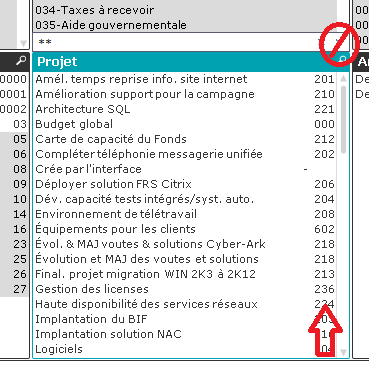
Example: type "236" or "Licence" and you'll end up at the same result.
I don't want the user to have to click on the "more search options" or whatever in the upper right corner.
I have a slew of other listboxes to accomplish the same.
Is there a way to accomplish this using only the visualisation tools,
or do I have to create fields in the script to get the two components in the same field and us that in my listbox?

 swuehl
- Mark as New
- Bookmark
- Subscribe
- Mute
- Subscribe to RSS Feed
- Permalink
- Report Inappropriate Content
The text search in project field should be standard and well known, right?
You can use an advanced search (start the search string with 😃 to search the expression results.
For example, if your expression is something like
=Sum(Hours)
Just use as search string
=Sum(Hours) = 236
Drawback: Your users may need to know the expressions and search syntax
sibrulotte
- Mark as New
- Bookmark
- Subscribe
- Mute
- Subscribe to RSS Feed
- Permalink
- Report Inappropriate Content
Definite drawback, I can't even write my expression like a boss without copy paste:
=only({1}[Extra comptable 3])
