Unlock a world of possibilities! Login now and discover the exclusive benefits awaiting you.

- Qlik Community
- :
- All Forums
- :
- QlikView
- :
- Listing values horizontally
- Subscribe to RSS Feed
- Mark Topic as New
- Mark Topic as Read
- Float this Topic for Current User
- Bookmark
- Subscribe
- Mute
- Printer Friendly Page

 selvakumarsr
- Mark as New
- Bookmark
- Subscribe
- Mute
- Subscribe to RSS Feed
- Permalink
- Report Inappropriate Content
Listing values horizontally
Hi All,
I want to list values in Pivot or Straight Table Horizontally. Is it possible?
I have tried cross table transformation but i'm not getting the expected output
Input Table:
| SID | PL |
|---|---|
| S001 | 123 |
| S001 | 456 |
| S002 | 345 |
| S002 | 888 |
| S002 | 777 |
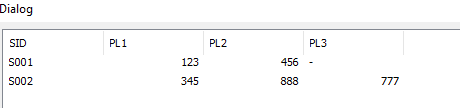
Expected Output:
| SID | PL | PL | PL | |
|---|---|---|---|---|
| S001 | 123 | 456 | - | |
| S002 | 345 | 888 | 777 |
Thanks,
Selva
Accepted Solutions

 vinieme12
- Mark as New
- Bookmark
- Subscribe
- Mute
- Subscribe to RSS Feed
- Permalink
- Report Inappropriate Content
OR if you want to show just in front end then this is enough
temp:
LOAD SID,
PL,
'PL'&AutoNumber(PL,SID) as InstanceName,
AutoNumber(PL,SID) as InstanceNum
FROM
[https://community.qlik.com/thread/300412]
(html, codepage is 1252, embedded labels, table is @1);
then use a Pivot Chart with SID and InstanceName as Dimension

If a post helps to resolve your issue, please accept it as a Solution.

 gayandilhara
- Mark as New
- Bookmark
- Subscribe
- Mute
- Subscribe to RSS Feed
- Permalink
- Report Inappropriate Content
Did you manage to get the table 1 to appear on QV? Normally I would expect the PL values to to aggregated for each SID eg: S001 -> 123 + 456. Maybe would help if you post the data model?
However in the expected output, you might be able to get the details as specified if you have a specific criteria for each column eg: PL1 = sum of all SID where condition = 1 etc.


- Mark as New
- Bookmark
- Subscribe
- Mute
- Subscribe to RSS Feed
- Permalink
- Report Inappropriate Content
Can i know the reason why you want to split only 3 columns from single Column? May be explain
selvakumarsr
- Mark as New
- Bookmark
- Subscribe
- Mute
- Subscribe to RSS Feed
- Permalink
- Report Inappropriate Content
Hi Anil,
It will be multiple (n number) of columns. For example i entered 3.
Thanks,
Selva
vinieme12
- Mark as New
- Bookmark
- Subscribe
- Mute
- Subscribe to RSS Feed
- Permalink
- Report Inappropriate Content
If you want to do this in script then use below
temp:
LOAD SID,
PL,
AutoNumber(PL,SID) as Instance
FROM
[https://community.qlik.com/thread/300412]
(html, codepage is 1252, embedded labels, table is @1);
t2:
load max(Instance) as NoOfCol
Resident temp;
let vNoOfCols = Peek('NoOfCol');
for i = 1 to $(vNoOfCols)
let vFieldName = 'PL'&$(i);
if $(i)=1 THEN
FACT:
LOAD DISTINCT SID
Resident temp;
Left Join(FACT)
LOAD SID
,PL as $(vFieldName)
Resident temp
Where Instance =$(i);
ELSE
Left Join(FACT)
LOAD SID
,PL as $(vFieldName)
Resident temp
Where Instance =$(i);
End if
Next i;
Drop table temp,t2;
If a post helps to resolve your issue, please accept it as a Solution.
vinieme12
- Mark as New
- Bookmark
- Subscribe
- Mute
- Subscribe to RSS Feed
- Permalink
- Report Inappropriate Content
OR if you want to show just in front end then this is enough
temp:
LOAD SID,
PL,
'PL'&AutoNumber(PL,SID) as InstanceName,
AutoNumber(PL,SID) as InstanceNum
FROM
[https://community.qlik.com/thread/300412]
(html, codepage is 1252, embedded labels, table is @1);
then use a Pivot Chart with SID and InstanceName as Dimension
If a post helps to resolve your issue, please accept it as a Solution.
