Unlock a world of possibilities! Login now and discover the exclusive benefits awaiting you.

- Qlik Community
- :
- All Forums
- :
- QlikView
- :
- Load Data from server Via ODBC automaticcaly
- Subscribe to RSS Feed
- Mark Topic as New
- Mark Topic as Read
- Float this Topic for Current User
- Bookmark
- Subscribe
- Mute
- Printer Friendly Page

 theboss-123
- Mark as New
- Bookmark
- Subscribe
- Mute
- Subscribe to RSS Feed
- Permalink
- Report Inappropriate Content
Load Data from server Via ODBC automaticcaly
Hello ,
please should be informed that i set up Qlikview Server i publish succefully my QVD,but i have a question
does it is possible to schedule load of data without intervention manually so when data will be updated on the database source the result could be displayedautomatically on the broweser.
thanks in advancy
Accepted Solutions

 Chip_Matejowsky
- Mark as New
- Bookmark
- Subscribe
- Mute
- Subscribe to RSS Feed
- Permalink
- Report Inappropriate Content
Hi @theboss-123,
Yes you can set up unattended, scheduled tasks with QlikView Server.
A prerequisite would be to ensure that the account performing the data reload, the QlikView service account running all the QV services, has the appropriate permissions on the database side to access/read the data. Another option would be setup account'/password to the database in the load script of the app.
The next question for you is if you have QlikView Publisher license applied or not? If you do have Publisher enabled, follow the steps listed in Section 3 Installing and Configuring QlikView Publisher in the attached A Simple Installation.docx file. This is an older Qlik Support document, but it still applies to your question.
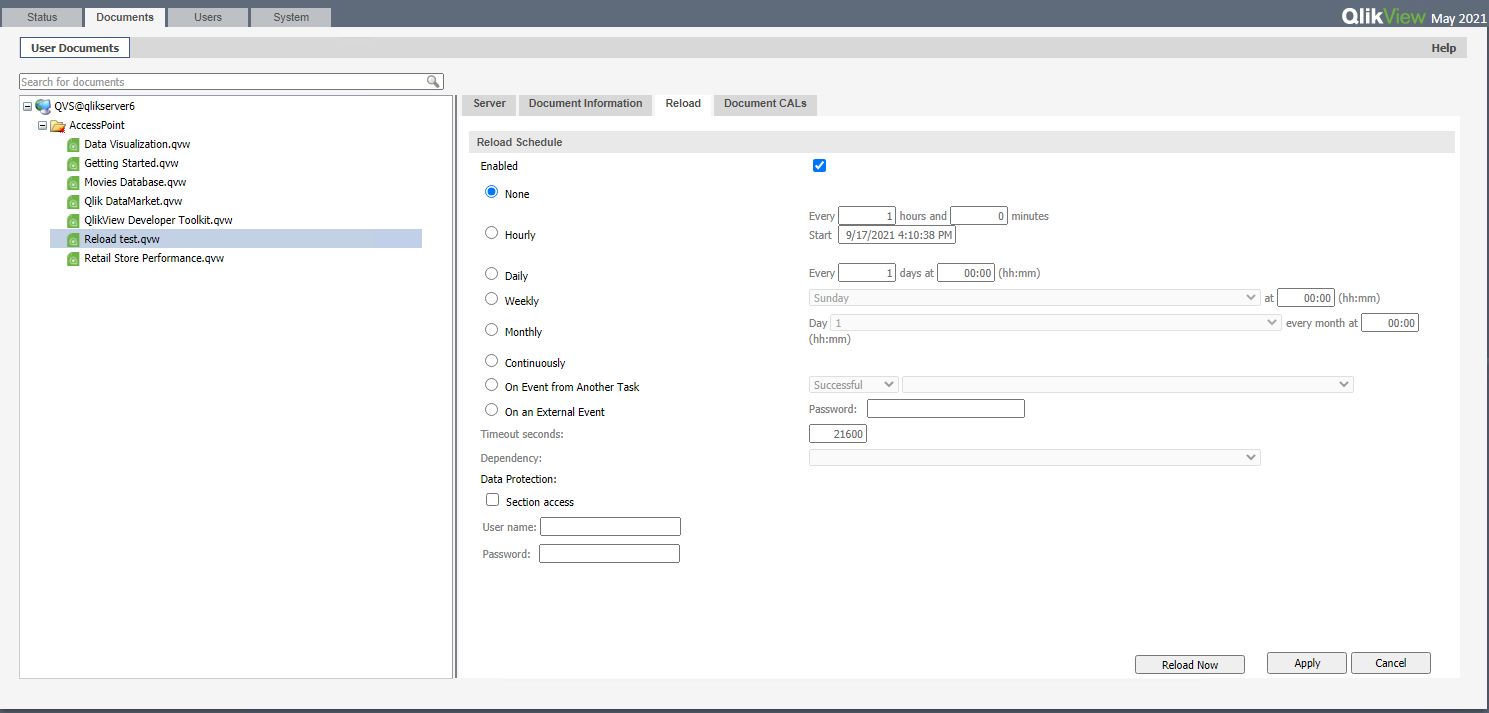
If you don't have Publisher enabled, then you'll be using the QlikView Server Reload Engine. In QlikView Management Console (QMC) > Documents > User Documents, highlight the QVW file you want to schedule the reload. Then click the Reload tab on the right, and configure your desired schedule.
Help users find answers! Don't forget to mark a solution that worked for you!
Chip_Matejowsky
- Mark as New
- Bookmark
- Subscribe
- Mute
- Subscribe to RSS Feed
- Permalink
- Report Inappropriate Content
Hi @theboss-123,
Yes you can set up unattended, scheduled tasks with QlikView Server.
A prerequisite would be to ensure that the account performing the data reload, the QlikView service account running all the QV services, has the appropriate permissions on the database side to access/read the data. Another option would be setup account'/password to the database in the load script of the app.
The next question for you is if you have QlikView Publisher license applied or not? If you do have Publisher enabled, follow the steps listed in Section 3 Installing and Configuring QlikView Publisher in the attached A Simple Installation.docx file. This is an older Qlik Support document, but it still applies to your question.
If you don't have Publisher enabled, then you'll be using the QlikView Server Reload Engine. In QlikView Management Console (QMC) > Documents > User Documents, highlight the QVW file you want to schedule the reload. Then click the Reload tab on the right, and configure your desired schedule.
Help users find answers! Don't forget to mark a solution that worked for you!
theboss-123
- Mark as New
- Bookmark
- Subscribe
- Mute
- Subscribe to RSS Feed
- Permalink
- Report Inappropriate Content
Hi Matejowsky thank you very much
