Unlock a world of possibilities! Login now and discover the exclusive benefits awaiting you.

- Qlik Community
- :
- All Forums
- :
- QlikView
- :
- Load Excel with merged row cell data
- Subscribe to RSS Feed
- Mark Topic as New
- Mark Topic as Read
- Float this Topic for Current User
- Bookmark
- Subscribe
- Mute
- Printer Friendly Page

 jasonseril
- Mark as New
- Bookmark
- Subscribe
- Mute
- Subscribe to RSS Feed
- Permalink
- Report Inappropriate Content
Load Excel with merged row cell data
Hello All,
I have an excel data (please see below), with merged rows cell,
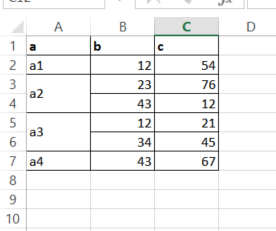
Please help which load script should i use, so that when load it will look like this (please see below)?
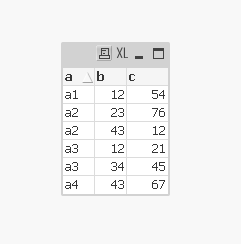
thanks in advance.
BR.
Jason
Accepted Solutions

 tamilarasu
- Mark as New
- Bookmark
- Subscribe
- Mute
- Subscribe to RSS Feed
- Permalink
- Report Inappropriate Content
Hi Jason,
Try,
Data:
LOAD If( IsNull(a), Peek(a),a) as a,
b,
c
FROM
Book2.xlsx
(ooxml, embedded labels, table is Sheet1);
Or
Data:
LOAD a,
b,
c
FROM
Book2.xlsx
(ooxml, embedded labels, table is Sheet1);
NoConcatenate
Load *,
If( IsNull(a), Peek(a),a) as NewValue
Resident Data;
Drop Table Data;
tamilarasu
- Mark as New
- Bookmark
- Subscribe
- Mute
- Subscribe to RSS Feed
- Permalink
- Report Inappropriate Content
Hi Jason,
Try,
Data:
LOAD If( IsNull(a), Peek(a),a) as a,
b,
c
FROM
Book2.xlsx
(ooxml, embedded labels, table is Sheet1);
Or
Data:
LOAD a,
b,
c
FROM
Book2.xlsx
(ooxml, embedded labels, table is Sheet1);
NoConcatenate
Load *,
If( IsNull(a), Peek(a),a) as NewValue
Resident Data;
Drop Table Data;
jasonseril
- Mark as New
- Bookmark
- Subscribe
- Mute
- Subscribe to RSS Feed
- Permalink
- Report Inappropriate Content
Hello Tamil,
Thank you much!
Best
Jason
