Unlock a world of possibilities! Login now and discover the exclusive benefits awaiting you.

- Qlik Community
- :
- All Forums
- :
- QlikView
- :
- Load distinct (a.k.a this ain't SQL)
- Subscribe to RSS Feed
- Mark Topic as New
- Mark Topic as Read
- Float this Topic for Current User
- Bookmark
- Subscribe
- Mute
- Printer Friendly Page

 markp201
- Mark as New
- Bookmark
- Subscribe
- Mute
- Subscribe to RSS Feed
- Permalink
- Report Inappropriate Content
Load distinct (a.k.a this ain't SQL)
Here's the scenario.
We have a product table with a key and attributes.
We have products in the detail which are not in the master (long story, don't ask)
I want to append the distinct products in the detail which are NOT already in the master.
This is easy with SQL or ETL tools but with click I get one of several results
1) Master as it is without detail
2) Master & distinct detail but detail duplicates with master
3) Pist de resistance - master & distinct detail but when I create a table the app crashes. (my personal favorite)
We are using Qlik Sense 3.0 - hoping this is not part of the problem.
I have read Barry's page on distinct load but wanted to check with the community.
Thanks for caring
Accepted Solutions

 hector_munoz
- Mark as New
- Bookmark
- Subscribe
- Mute
- Subscribe to RSS Feed
- Permalink
- Report Inappropriate Content
Hi Mark,
I suposse what you need is to complete a master table from data that belongs to another table, right? For example, in 'product master' table we have 2 products, in 'product fact' table we have 3 and we want to add to the first table the product that is missing:
BEFORE:
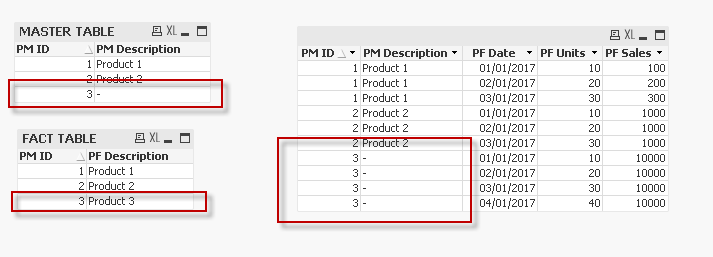
AFTER:
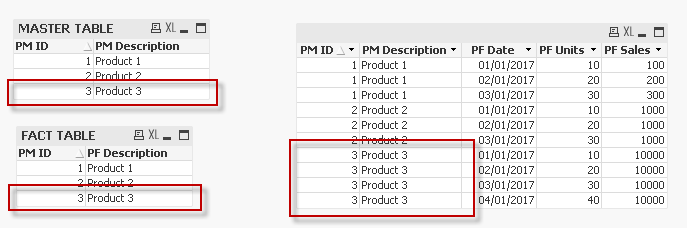
If this is similar to what you need, try the following code:
PRODUCT_MASTER:
LOAD * INLINE [
PM ID, PM Description
1, Product 1
2, Product 2
];
PRODUCT_FACTS:
LOAD * INLINE [
PM ID, PF Description, PF Date, PF Units, PF Sales
1, Product 1, 01/01/2017, 10, 100
1, Product 1, 02/01/2017, 20, 200
1, Product 1, 03/01/2017, 30, 300
2, Product 2, 01/01/2017, 10, 1000
2, Product 2, 02/01/2017, 20, 1000
2, Product 2, 03/01/2017, 30, 1000
3, Product 3, 01/01/2017, 10, 10000
3, Product 3, 02/01/2017, 20, 10000
3, Product 3, 03/01/2017, 30, 10000
3, Product 3, 04/01/2017, 40, 10000
];
CONCATENATE (PRODUCT_MASTER)
LOAD DISTINCT [PM ID] AS [PM ID],
[PF Description] AS [PM Description]
RESIDENT PRODUCT_FACTS
WHERE Not(Exists('PM Description', 'PF Description'));
I also attach you a QlikView app.
Regards,
H
hector_munoz
- Mark as New
- Bookmark
- Subscribe
- Mute
- Subscribe to RSS Feed
- Permalink
- Report Inappropriate Content
Hi Mark,
I suposse what you need is to complete a master table from data that belongs to another table, right? For example, in 'product master' table we have 2 products, in 'product fact' table we have 3 and we want to add to the first table the product that is missing:
BEFORE:
AFTER:
If this is similar to what you need, try the following code:
PRODUCT_MASTER:
LOAD * INLINE [
PM ID, PM Description
1, Product 1
2, Product 2
];
PRODUCT_FACTS:
LOAD * INLINE [
PM ID, PF Description, PF Date, PF Units, PF Sales
1, Product 1, 01/01/2017, 10, 100
1, Product 1, 02/01/2017, 20, 200
1, Product 1, 03/01/2017, 30, 300
2, Product 2, 01/01/2017, 10, 1000
2, Product 2, 02/01/2017, 20, 1000
2, Product 2, 03/01/2017, 30, 1000
3, Product 3, 01/01/2017, 10, 10000
3, Product 3, 02/01/2017, 20, 10000
3, Product 3, 03/01/2017, 30, 10000
3, Product 3, 04/01/2017, 40, 10000
];
CONCATENATE (PRODUCT_MASTER)
LOAD DISTINCT [PM ID] AS [PM ID],
[PF Description] AS [PM Description]
RESIDENT PRODUCT_FACTS
WHERE Not(Exists('PM Description', 'PF Description'));
I also attach you a QlikView app.
Regards,
H
markp201
- Mark as New
- Bookmark
- Subscribe
- Mute
- Subscribe to RSS Feed
- Permalink
- Report Inappropriate Content
Thanks - it worked.
markp201
- Mark as New
- Bookmark
- Subscribe
- Mute
- Subscribe to RSS Feed
- Permalink
- Report Inappropriate Content
The solution is getting me the required but the application is crashing when an object references this table.
If I create a table with the %ProductKey and Product, it works for a bit but scrolling through the values eventually crashes the app. If I create a table with only Product, it crashes immediately.
Been working on this for days now and getting a little perturbed.
I'm exporting to the 3.2 desktop. If it works there, I guess the next step is to open a ticket with support.
hector_munoz
- Mark as New
- Bookmark
- Subscribe
- Mute
- Subscribe to RSS Feed
- Permalink
- Report Inappropriate Content
Hi Mark,
Could you send an image of the model indicating where are the fields? Maybe we can help you...
Regards,
H
markp201
- Mark as New
- Bookmark
- Subscribe
- Mute
- Subscribe to RSS Feed
- Permalink
- Report Inappropriate Content
We have it working. There was one row which caused sense to crash. When the row was removed, it worked perfectly. I believe this was an OS/Qlik problem because it happened with windows 7 pro but not Windows 10 pro. I checked the release notes but didn't find anything about compatibility.
