Unlock a world of possibilities! Login now and discover the exclusive benefits awaiting you.

- Qlik Community
- :
- All Forums
- :
- QlikView
- :
- Load table modifying the structure
- Subscribe to RSS Feed
- Mark Topic as New
- Mark Topic as Read
- Float this Topic for Current User
- Bookmark
- Subscribe
- Mute
- Printer Friendly Page

- Mark as New
- Bookmark
- Subscribe
- Mute
- Subscribe to RSS Feed
- Permalink
- Report Inappropriate Content
Load table modifying the structure
I have a database in excel like this structure:
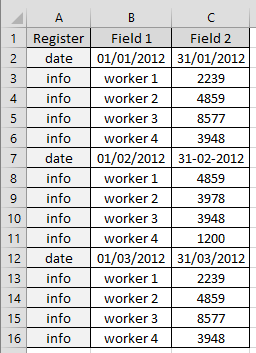
And I need to load this in a qlikview's table to stay like this:

Anyone can help me? Thanks.
Accepted Solutions

 luciancotea
- Mark as New
- Bookmark
- Subscribe
- Mute
- Subscribe to RSS Feed
- Permalink
- Report Inappropriate Content
Table1:
LOAD Register, Field1, Field2,
if(peek(Register) <> Register and Register <> 'info', RowNo(), if(isnull(peek(ID)), 1, peek(ID)) ) as ID
FROM [Book1.xlsx] (ooxml, embedded labels, table is Sheet1);
Table2:
LOAD Field1 as Date_Start, Field2 as Date_End, ID
RESIDENT Table1 WHERE Register = 'date';
left join
LOAD ID, Field1 as Worker, num(Field2) as Value
RESIDENT Table1 WHERE Register = 'info';
drop table Table1;
drop field ID;
- Mark as New
- Bookmark
- Subscribe
- Mute
- Subscribe to RSS Feed
- Permalink
- Report Inappropriate Content
You can loop through each record in turn, and:
1. if the record is a date
- set variables to store the start and end date
2. if the record is not a date
- add record to a new table using the stored start and end date
To do the loop you would need to test the number of records first.
This would look something like this:
NewTable:
LOAD * INLINE [ RowKey ];
OriginalTable:
LOAD
Register,
Field1,
Field2
FROM .... your spreadsheet
LET vRowCount = NoOfRows('Register');
SET a = 0;
DO WHILE a <= (vRowCount-1)
LET LoopType = peek('Register',a,'OriginalTable');
IF LoopType = 'date' THEN
LET vStartDate = peek('Field1',a,'OriginalTable');
LET vEndDate = peek('Field2',a,'OriginalTable');
ELSE
LET vWorker = peek('Field1',a,'OriginalTable');
LET vValue = peek('Field2',a,'OriginalTable');
CONCATENATE (NewTable)
LOAD
RowNo() AS RowKey,
'$(vStartDate)' AS StartDate,
'$(vEndDate)' AS EndDate,
'$(vWorker)' AS Worker,
'$(vValue)' AS Value
AUTOGENERATE 1;
ENDIF
LET a = a + 1;
LOOP
Jonathan
luciancotea
- Mark as New
- Bookmark
- Subscribe
- Mute
- Subscribe to RSS Feed
- Permalink
- Report Inappropriate Content
Table1:
LOAD Register, Field1, Field2,
if(peek(Register) <> Register and Register <> 'info', RowNo(), if(isnull(peek(ID)), 1, peek(ID)) ) as ID
FROM [Book1.xlsx] (ooxml, embedded labels, table is Sheet1);
Table2:
LOAD Field1 as Date_Start, Field2 as Date_End, ID
RESIDENT Table1 WHERE Register = 'date';
left join
LOAD ID, Field1 as Worker, num(Field2) as Value
RESIDENT Table1 WHERE Register = 'info';
drop table Table1;
drop field ID;
- Mark as New
- Bookmark
- Subscribe
- Mute
- Subscribe to RSS Feed
- Permalink
- Report Inappropriate Content
Perfect Lucian Cotea, this works!! Thanks