Unlock a world of possibilities! Login now and discover the exclusive benefits awaiting you.

- Qlik Community
- :
- All Forums
- :
- QlikView
- :
- Loading Files on a Condition
- Subscribe to RSS Feed
- Mark Topic as New
- Mark Topic as Read
- Float this Topic for Current User
- Bookmark
- Subscribe
- Mute
- Printer Friendly Page

 FranziskaNewbie
- Mark as New
- Bookmark
- Subscribe
- Mute
- Subscribe to RSS Feed
- Permalink
- Report Inappropriate Content
Loading Files on a Condition
Hello everyone,
I am relatively new to QlikView.
I have two different types of csv files in one folder, monthly data and weekly data for example:
20200924_ABC_Month_STAT.csv
20200924_EFC_ABC.csv
If the Filename contains "Month" I want to load script A with the monthly data and store it in a "monthlydata.qvd".
If the Filename does not contain "Month" I want to load script B with the weekly data and store it in a "weeklydata.qvd".
I have tried this
if (Wildmatch($(vSourceFile), '*Month*')) THEN
but it didn't work.
Can you please help me?
Thank you and best regards,
Franziska
- Tags:
- qlikview_scripting
Accepted Solutions

 Taoufiq_Zarra
- Mark as New
- Bookmark
- Subscribe
- Mute
- Subscribe to RSS Feed
- Permalink
- Report Inappropriate Content
@FranziskaNewbie I have added some information I hope this is useful for you.
Let's suppose that the folder containing csv files is vPath.
I go through all the files in the folder, and then in the name I added the date also as an indication
let vPath ='C:\Users\t.zarra\Downloads\Desktop\';

For each File in FileList('$(vPath)\*.csv')

let Vflag=wildmatch(Upper('$(File)'),'*MONTH*');
let Vtag=Date(today(),'YYYYMMDD');

if '$(Vflag)'=0 then

		Table:

		Load *

		From $(File)
		(txt, codepage is 1252, embedded labels, delimiter is '\t', msq);

		Store Table into '$(vPath)\$(Vtag)_weeklydata.qvd' (qvd);
		drop table Table;

else

		Table:

		Load *

		From $(File)
		(txt, codepage is 1252, embedded labels, delimiter is '\t', msq);

		Store Table into '$(vPath)\$(Vtag)_monthlydata.qvd' (qvd);
		drop table Table;

endif


NEXT
I tested for this example :
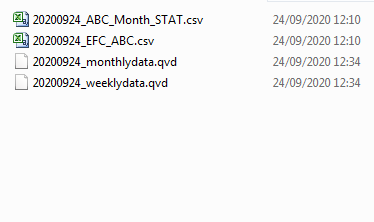
Taoufiq ZARRA
"Please LIKE posts and "Accept as Solution" if the provided solution is helpful "
(you can mark up to 3 "solutions") 😉
Taoufiq_Zarra
- Mark as New
- Bookmark
- Subscribe
- Mute
- Subscribe to RSS Feed
- Permalink
- Report Inappropriate Content
@FranziskaNewbie I have added some information I hope this is useful for you.
Let's suppose that the folder containing csv files is vPath.
I go through all the files in the folder, and then in the name I added the date also as an indication
let vPath ='C:\Users\t.zarra\Downloads\Desktop\';

For each File in FileList('$(vPath)\*.csv')

let Vflag=wildmatch(Upper('$(File)'),'*MONTH*');
let Vtag=Date(today(),'YYYYMMDD');

if '$(Vflag)'=0 then

		Table:

		Load *

		From $(File)
		(txt, codepage is 1252, embedded labels, delimiter is '\t', msq);

		Store Table into '$(vPath)\$(Vtag)_weeklydata.qvd' (qvd);
		drop table Table;

else

		Table:

		Load *

		From $(File)
		(txt, codepage is 1252, embedded labels, delimiter is '\t', msq);

		Store Table into '$(vPath)\$(Vtag)_monthlydata.qvd' (qvd);
		drop table Table;

endif


NEXT
I tested for this example :
Taoufiq ZARRA
"Please LIKE posts and "Accept as Solution" if the provided solution is helpful "
(you can mark up to 3 "solutions") 😉
FranziskaNewbie
- Mark as New
- Bookmark
- Subscribe
- Mute
- Subscribe to RSS Feed
- Permalink
- Report Inappropriate Content
Hi @Taoufiq_Zarra ,
Your solution worked perfectly, thank you so much!
 Deepak_dhikale
- Mark as New
- Bookmark
- Subscribe
- Mute
- Subscribe to RSS Feed
- Permalink
- Report Inappropriate Content
Hi @Taoufiq_Zarra and @FranziskaNewbie
I have similar problem .I want to separate the data load script based on filename. i am fetching data from SFTP server.
FilesAndFolders:
LOAD
Name,
Path,
IsDirectory,
Size,
SubField(SubField(Name,' ',1),'_',2) as newfile
FROM [lib://sftp_url (allenlund_nprinting)]
LET vNoOfFiles = NoOfRows('FilesAndFolders');
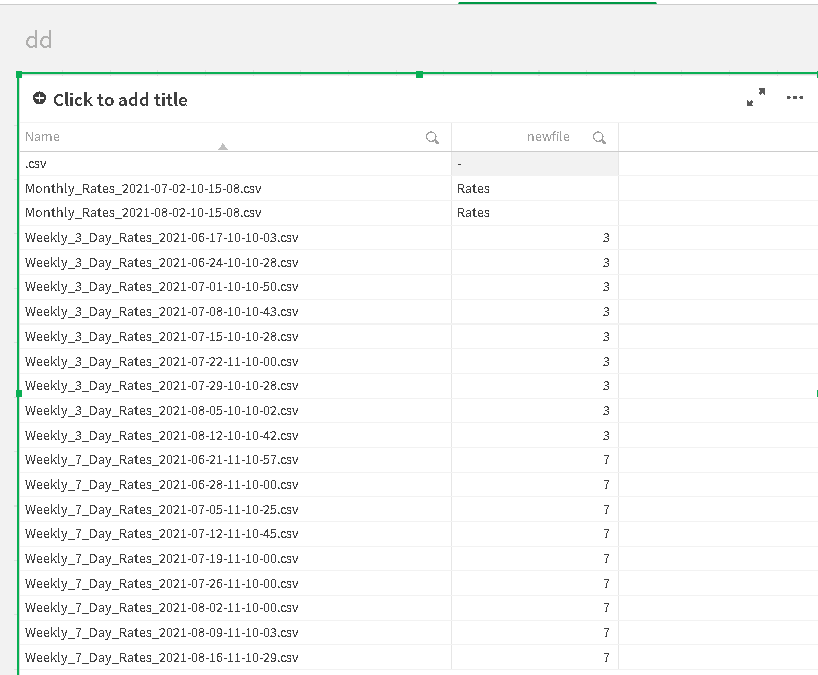
with the above script i get below output
i just want to make separate load script and separate qvd for weekly_3_day_rates and weekly_7_day_rates . as all tables contains same no of rows and columns.
thank you 🙂