Unlock a world of possibilities! Login now and discover the exclusive benefits awaiting you.

- Qlik Community
- :
- All Forums
- :
- QlikView
- :
- Logs for Qlikview Desktop?
- Subscribe to RSS Feed
- Mark Topic as New
- Mark Topic as Read
- Float this Topic for Current User
- Bookmark
- Subscribe
- Mute
- Printer Friendly Page

 priyav24
- Mark as New
- Bookmark
- Subscribe
- Mute
- Subscribe to RSS Feed
- Permalink
- Report Inappropriate Content
Logs for Qlikview Desktop?
Hello Everybody,
Am currently using the qlikview desktop licensed version11 , am using a schedule reloading on the daily basis,i want to view the reloading status log.is it possible to get those logs in qlikview version?
Regards,
Priya
- Tags:
- new_to_qlikview
- « Previous Replies
-
- 1
- 2
- Next Replies »

- Mark as New
- Bookmark
- Subscribe
- Mute
- Subscribe to RSS Feed
- Permalink
- Report Inappropriate Content
Hi
if u r working in server,then auto reload possible by scheduling ..
Otherwise in in local desktop scheduling reload not possible...u need to do it manually load.
And log file u will get in ur application path.
"go to Settings > Document Properties > General Tab --check "generate Logfile" &
check "Timestamp in Logfile Name"
regards-bika
- Mark as New
- Bookmark
- Subscribe
- Mute
- Subscribe to RSS Feed
- Permalink
- Report Inappropriate Content
Hi
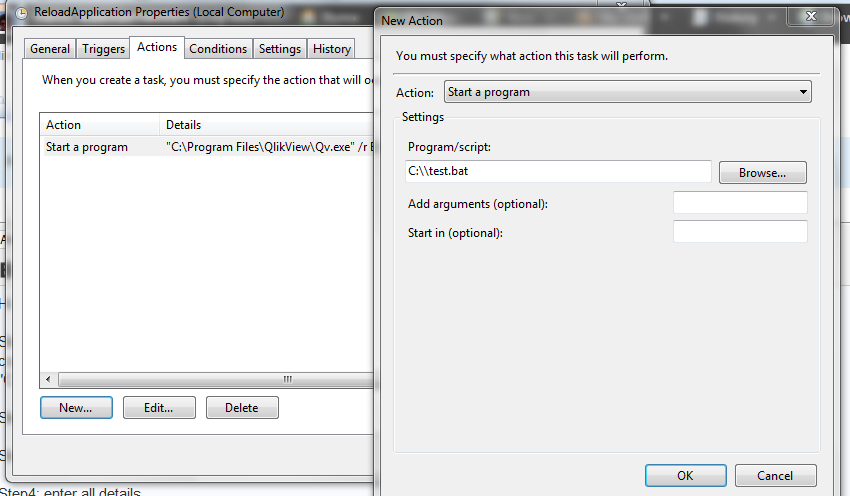
Step1: Create the bat file to reload the Application like below
copy and paste it in notepad and save it with extension .bat.
"C:\Program Files\QlikView\Qv.exe" /r "F:\qvsdocs\binary\publish\test1.qvw" // In here change the location based on ur file.
Step2: Open the taskscheduler(Run-->Taskscheduler)
Step3: Create the task (dialoag box will open, there u can see some tabs such as General, trigger, Action, condition)
Step4: enter all details
Step5: In trigger tab, U can schedule the time to reload as ur expected time for weekly or daily.
Step6: In Action tab, U can give that bat file location.
Regards,
Kabilan K.
- « Previous Replies
-
- 1
- 2
- Next Replies »