Unlock a world of possibilities! Login now and discover the exclusive benefits awaiting you.

- Qlik Community
- :
- All Forums
- :
- QlikView
- :
- Loop or other suggestions?
- Subscribe to RSS Feed
- Mark Topic as New
- Mark Topic as Read
- Float this Topic for Current User
- Bookmark
- Subscribe
- Mute
- Printer Friendly Page

- Mark as New
- Bookmark
- Subscribe
- Mute
- Subscribe to RSS Feed
- Permalink
- Report Inappropriate Content
Loop or other suggestions?
Hi all.
Can you help me solve this one?
In the attached file I have the sheet "Base", where I have sorted the fields "NAME" and "GROUP" based on the field "PRIORITY_ALL".
Now I want to loop the table into a new table where all the names are given a new priority called "PRIORITY_GROUP" based on their priority in "PRIORITY_ALL" and which group in "GROUP" they belong to.
I have manually illustrated the result it's supposed to be in the sheet "After group priority".
Finally it should be used for creating a pivot table as seen in the sheet "Pivot solution" if it makes more sense to you.
I really hope you can help me with this Little issue.
Best Regards,
Johnni Kirstein
- Tags:
- new_to_qlikview
Accepted Solutions

 MarcoWedel
- Mark as New
- Bookmark
- Subscribe
- Mute
- Subscribe to RSS Feed
- Permalink
- Report Inappropriate Content
Hi,
one possible solution for your sample data:
LOAD *,
    AutoNumber(PRIORITY_ALL, GROUP) as PRIORITY_GROUP
FROM [Sandbox_Loop.xlsx] (ooxml, embedded labels, table is Base);
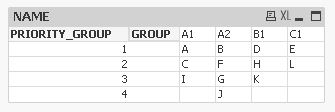
hope this helps
regards
Marco

 vgutkovsky
- Mark as New
- Bookmark
- Subscribe
- Mute
- Subscribe to RSS Feed
- Permalink
- Report Inappropriate Content
That's easy enough. Assuming your first table is named "data" then you can do something like this:
LOAD
*,
if(GROUP = previous(GROUP),
peek(PRIORITY_GROUP)+1,
1
) as PRIORITY_GROUP
RESIDENT data
ORDER BY GROUP,PRIORITY_ALL
;
Regards,
Vlad

 Gysbert_Wassena
- Mark as New
- Bookmark
- Subscribe
- Mute
- Subscribe to RSS Feed
- Permalink
- Report Inappropriate Content
See attached qvw
talk is cheap, supply exceeds demand
MarcoWedel
- Mark as New
- Bookmark
- Subscribe
- Mute
- Subscribe to RSS Feed
- Permalink
- Report Inappropriate Content
Hi,
one possible solution for your sample data:
LOAD *,
    AutoNumber(PRIORITY_ALL, GROUP) as PRIORITY_GROUP
FROM [Sandbox_Loop.xlsx] (ooxml, embedded labels, table is Base);
hope this helps
regards
Marco
MarcoWedel
- Mark as New
- Bookmark
- Subscribe
- Mute
- Subscribe to RSS Feed
- Permalink
- Report Inappropriate Content
Hi again,
for unsorted input tables you could extend this solution to:
tab1:
LOAD * FROM [Sandbox_Loop.xlsx] (ooxml, embedded labels, table is Base);

Left Join
LOAD NAME, AutoNumber(PRIORITY_ALL, GROUP) as PRIORITY_GROUP
Resident tab1
Order By PRIORITY_ALL;
hope this helps
regards
Marco
- Mark as New
- Bookmark
- Subscribe
- Mute
- Subscribe to RSS Feed
- Permalink
- Report Inappropriate Content
All the answers are correct but Marco had the easiest one.
What I had in mind to solve it was making several loads of the table where each load contains a unique value from the field "GROUP". I think this is still possible but not the best way to do it.
Thank you all for your help.
Best Regards,
Johnni Kirstein